

Quickstart
Get from zero to a running LangSmith instance on GKE in under an hour.
# 1 — Unzip the Terraform modules provided by your LangChain SA
unzip gcp.zip
cd gcp
# 2 — Authenticate to GCP
gcloud auth login
gcloud config set project <your-project-id>
gcloud auth application-default login
# 3 — Generate terraform.tfvars interactively
#     Re-running is safe — Enter accepts current values
make quickstart
# 4 — Set up secrets in Secret Manager
#     Auto-generates passwords and Fernet keys — must be sourced
source infra/scripts/setup-env.sh
# 5 — Deploy infrastructure (~25–30 min)
make init
make plan
make apply
# 6 — Configure kubectl
make kubeconfig

# Verify nodes are ready
kubectl get nodes
# 7 — Deploy LangSmith
make init-values
make deploy
# 8 — Get the Gateway IP for DNS
kubectl get gateway -n langsmith \
  -o jsonpath='{.items[0].status.addresses[0].value}'
LangSmith on GCPSelf-hosted deployment on GKE, managed with Terraform.
Two deployment tiers
| Tier | Postgres | Redis | ClickHouse | Use case |
|---|---|---|---|---|
| Light | In-cluster pod | In-cluster pod | In-cluster pod | Demo / POC / short-lived dev |
| Production | Cloud SQL (private IP) | Memorystore (private IP) | LangChain Managed | Persistent, scalable deployments |
GCP resources created (Pass 1)
| Resource | Type | Purpose |
|---|---|---|
| VPC Network | google_compute_network | Isolated network with regional routing |
| Subnet | google_compute_subnetwork | GKE nodes, pods, and services CIDRs |
| Cloud Router + NAT | google_compute_router | Outbound internet access for private nodes |
| GKE Cluster | google_container_cluster | Kubernetes — Standard or Autopilot mode |
| Node Pool | google_container_node_pool | Autoscaling worker nodes with Workload Identity |
| Cloud SQL | google_sql_database_instance | PostgreSQL — org config, run metadata, graph checkpoints |
| Memorystore Redis | google_redis_instance | Trace ingestion queue, pub/sub |
| GCS Bucket | google_storage_bucket | Raw trace objects with TTL lifecycle rules |
| cert-manager | Helm | Automated TLS via Let's Encrypt |
| KEDA | Helm | Event-driven autoscaling (required for Deployments) |
| Envoy Gateway | Helm | Optional ingress for external traffic + TLS termination |
Prerequisites
Required tools
# Google Cloud SDK (>= 450)
brew install --cask google-cloud-sdk
# Linux: https://cloud.google.com/sdk/docs/install

# Terraform (>= 1.5)
brew tap hashicorp/tap && brew install hashicorp/tap/terraform

# kubectl
brew install kubectl

# Helm (>= 3.12)
brew install helm

# Verify
gcloud version
terraform version
kubectl version --client
helm version
Required GCP IAM roles
| Role | Purpose |
|---|---|
roles/container.admin | Create and manage GKE clusters |
roles/compute.networkAdmin | Create VPC, subnets, firewall rules |
roles/iam.serviceAccountAdmin | Create service accounts for Workload Identity |
roles/cloudsql.admin | Create and manage Cloud SQL instances |
roles/redis.admin | Create and manage Memorystore Redis instances |
roles/storage.admin | Create GCS buckets and lifecycle policies |
roles/resourcemanager.projectIamAdmin | Grant IAM bindings during provisioning |
roles/servicenetworking.networksAdmin | Create private service connections for Cloud SQL and Memorystore |
Authenticate and configure project
gcloud auth login
gcloud config set project <your-project-id>
gcloud auth application-default login

# Terraform enables these automatically — or enable manually:
gcloud services enable \
  container.googleapis.com \
  sqladmin.googleapis.com \
  redis.googleapis.com \
  storage.googleapis.com \
  iam.googleapis.com \
  servicenetworking.googleapis.com \
  cloudresourcemanager.googleapis.com \
--project <your-project-id>servicenetworking.googleapis.com API and roles/servicenetworking.networksAdmin are required before those resources can be created — the Terraform module handles this automatically.Repository Layout
terraform/gcp/
├── Makefile                    ← All commands — start here (make help)
├── infra/
│   ├── main.tf                 ← Root config — enables APIs, wires all sub-modules
│   ├── variables.tf            ← All configurable inputs with defaults
│   ├── locals.tf               ← Naming convention: {prefix}-{env}-{resource}-{suffix}
│   ├── outputs.tf              ← Cluster, DB, Redis, Storage outputs
│   ├── modules/
│   │   ├── networking/         ← VPC, subnet, Cloud Router, Cloud NAT, private service connection
│   │   ├── k8s-cluster/        ← GKE Standard/Autopilot, node pool, Workload Identity
│   │   ├── postgres/           ← Cloud SQL PostgreSQL, HA, private IP, deletion protection
│   │   ├── redis/              ← Memorystore Redis, HA tier, private IP
│   │   ├── storage/            ← GCS bucket with TTL lifecycle rules (ttl_s/ ttl_l/)
│   │   ├── k8s-bootstrap/      ← Namespaces, K8s secrets, cert-manager, KEDA
│   │   ├── ingress/            ← Envoy Gateway (Gateway API), GatewayClass, HTTPRoute
│   │   ├── iam/                ← Workload Identity service accounts and IAM bindings
│   │   ├── dns/                ← Cloud DNS managed zone (optional)
│   │   └── secrets/            ← Secret Manager secrets (optional)
│   └── scripts/
│       ├── _common.sh          ← Shared helpers (tfvar parser, color output)
│       ├── preflight.sh        ← Pre-Terraform tooling / auth / API checks
│       ├── quickstart.sh       ← Interactive setup wizard — generates terraform.tfvars
│       ├── setup-env.sh        ← Exports TF_VAR_* secrets from Secret Manager (source it)
│       ├── status.sh           ← Deployment health check
│       ├── manage-secrets.sh   ← Secret Manager CRUD (list/get/set/validate/delete)
│       └── tf-run.sh           ← Terraform wrapper that auto-sources setup-env.sh
└── helm/
    ├── scripts/
    │   ├── deploy.sh               ← Helm deploy — values chain + Workload Identity annotation
    │   ├── get-kubeconfig.sh       ← gcloud get-credentials wrapper
    │   ├── init-values.sh          ← Generates values-overrides.yaml from Terraform outputs
    │   ├── preflight-check.sh      ← Pre-deploy validation (tools, cluster, helm repo)
    │   └── uninstall.sh            ← Helm uninstall + operator resource cleanup
    └── values/
        ├── values.yaml             ← GCP base Helm values (Gateway, GCS config) — tracked in git
        ├── values-overrides.yaml   ← Live file — gitignored, generated by init-values.sh
└── examples/ ← Source templates — tracked in git, copied by init-values.sh{prefix}-{environment}-{resource}-{suffix} (e.g. ls-prod-gke-a1b2c3d4). The random suffix is generated once from name_prefix, environment, and project_id — stored in state to stay stable across applies. Set unique_suffix = false to disable.Configuration
Create a terraform.tfvars file in terraform/gcp/infra/:
# Required
project_id            = "<your-gcp-project-id>"
environment           = "prod"
name_prefix           = "ls"
langsmith_license_key = "<your-license-key>"
langsmith_domain      = "langsmith.<your-domain>"

# Region / zone
region = "us-west2"
zone   = "us-west2-a"

# GKE
gke_use_autopilot   = false
gke_machine_type    = "e2-standard-4"
gke_min_nodes       = 2
gke_max_nodes       = 10
gke_release_channel = "REGULAR"

# Cloud SQL
postgres_source   = "external"
postgres_version  = "POSTGRES_15"
postgres_tier     = "db-custom-2-8192"
postgres_password = "<strong-password>"   # or: export TF_VAR_postgres_password=...

# Memorystore Redis
redis_source      = "external"
redis_memory_size = 5
redis_version     = "REDIS_7_0"

# ClickHouse
clickhouse_source = "in-cluster"

# Ingress + TLS
install_ingress        = true
ingress_type           = "envoy"
tls_certificate_source = "letsencrypt"
letsencrypt_email      = "<ops@your-domain>"

# Sizing + addon flags
sizing_profile = "production"
# enable_deployments   = true
# enable_agent_builder = true
# enable_insights      = true
# enable_polly         = true
Terraform state backend (recommended for production)
Uncomment the backend block in terraform/gcp/infra/main.tf:
backend "gcs" {
  bucket = "<your-terraform-state-bucket>"
  prefix = "langsmith/state"
}
Pass 1 — Required Infrastructure
cd terraform/gcp

# First time? Run the interactive setup wizard:
make quickstart   # generates terraform.tfvars from guided prompts

# Set up secrets in Secret Manager (auto-generates passwords + Fernet keys)
# Must be sourced — not executed — to export TF_VAR_* into your shell
source infra/scripts/setup-env.sh

make preflight    # checks gcloud auth, required APIs, and IAM roles
make init
make plan
make applysource infra/scripts/setup-env.sh — not ./infra/scripts/setup-env.sh. The script exports TF_VAR_postgres_password and other credentials into the calling shell. Running without source silently exports nothing and Terraform fails at plan time.After apply — get cluster credentials
make kubeconfig

kubectl get nodes
kubectl get ns
Verify bootstrap components
kubectl get pods -n cert-manager
kubectl get pods -n keda
kubectl get secrets -n langsmith
Pass 1 — Infrastructure
Provisions: VPC, GKE cluster, Cloud SQL PostgreSQL, Memorystore Redis, GCS bucket, K8s bootstrap (namespaces, K8s secrets, cert-manager, KEDA).
# Recommended workflow
cd modules/gcp
make preflight
make init
make plan
make apply

# Equivalent direct Terraform flow
cd modules/gcp/infra

terraform init
terraform plan -var-file=terraform.tfvars
terraform apply -var-file=terraform.tfvars
Duration: ~25–35 minutes. GKE creation: 10–15 min. Cloud SQL with HA: additional 10 min. Do not interrupt.
After apply — get cluster credentials
cd ../helm/scripts
./get-kubeconfig.sh

kubectl get nodes
kubectl get ns
Verify bootstrap components
kubectl get pods -n cert-manager
kubectl get pods -n keda
kubectl get secrets -n langsmith
Pass 2 — Required LangSmith
Generate Helm values from Terraform outputs and deploy:
cd terraform/gcp

make init-values   # reads Terraform outputs → writes values-overrides.yaml
make deploy # helm upgrade --install with the full values chaininit-values.sh reads Terraform outputs and writes helm/values/values-overrides.yaml with your hostname, GCS bucket name, Cloud SQL endpoint, Redis endpoint, and Workload Identity client-id. It also copies sizing and addon files from examples/ based on your sizing_profile and enable_* flags.Verify deployment and configure DNS
kubectl get pods -n langsmith

# Get Gateway external IP — create an A record pointing your domain here
EXTERNAL_IP=$(kubectl get svc -n envoy-gateway-system \
  -l gateway.envoyproxy.io/owning-gateway-name=langsmith-gateway \
  -o jsonpath='{.items[0].status.loadBalancer.ingress[0].ip}')
echo "A record: $EXTERNAL_IP → <your-langsmith-domain>"

# Verify TLS certificate
kubectl get certificate -n langsmith
Pass 2 — LangSmith Helm Deploy
Use the scripted flow (includes preflight + kubeconfig refresh):
cd modules/gcp/helm/scripts
./deploy.sh
Or run manually — generate secrets first:
export API_KEY_SALT=$(openssl rand -base64 32)
export JWT_SECRET=$(openssl rand -base64 32)
export AGENT_BUILDER_ENCRYPTION_KEY=$(python3 -c \
  "from cryptography.fernet import Fernet; print(Fernet.generate_key().decode())")
export INSIGHTS_ENCRYPTION_KEY=$(python3 -c \
  "from cryptography.fernet import Fernet; print(Fernet.generate_key().decode())")
export ADMIN_EMAIL="admin@example.com"
export ADMIN_PASSWORD="<strong-password>"

# GCS HMAC credentials (create in GCP Console: Storage > Settings > Interoperability)
export GCS_ACCESS_KEY="<your-hmac-access-key>"
export GCS_ACCESS_SECRET="<your-hmac-secret>"
helm repo add langchain https://langchain-ai.github.io/helm
helm repo update

helm upgrade --install langsmith langchain/langsmith \
  --namespace langsmith \
  --create-namespace \
  -f ../helm/values/values.yaml \
  -f ../helm/values/values-overrides.yaml \
  --set config.langsmithLicenseKey="<your-license-key>" \
  --set config.apiKeySalt="$API_KEY_SALT" \
  --set config.basicAuth.jwtSecret="$JWT_SECRET" \
  --set config.hostname="<your-langsmith-domain>" \
  --set config.basicAuth.initialOrgAdminEmail="$ADMIN_EMAIL" \
  --set config.basicAuth.initialOrgAdminPassword="$ADMIN_PASSWORD" \
  --set config.agentBuilder.encryptionKey="$AGENT_BUILDER_ENCRYPTION_KEY" \
  --set config.insights.encryptionKey="$INSIGHTS_ENCRYPTION_KEY" \
  --set config.blobStorage.bucketName="$(terraform output -raw storage_bucket_name)" \
  --set config.blobStorage.accessKey="$GCS_ACCESS_KEY" \
  --set config.blobStorage.accessKeySecret="$GCS_ACCESS_SECRET" \
  --set gateway.enabled=true \
  --set ingress.enabled=false \
  --wait --timeout 15m
Verify and configure DNS
kubectl get pods -n langsmith

# Get Gateway external IP
EXTERNAL_IP=$(kubectl get svc -n envoy-gateway-system \
  -l gateway.envoyproxy.io/owning-gateway-name=langsmith-gateway \
  -o jsonpath='{.items[0].status.loadBalancer.ingress[0].ip}')

echo "Create A record: $EXTERNAL_IP -> <your-langsmith-domain>"

kubectl get certificate -n langsmith
Pass 3 — Optional LangSmith Deployments
Enable the flag in infra/terraform.tfvars and run:
# infra/terraform.tfvars
enable_deployments = truecd terraform/gcp
make apply # pushes enable_deployments flag (KEDA managed by Terraform)
make init-values # picks up enable_deployments = true
make deploy # rolls out host-backend + listener + operatorVerify
kubectl get pods -n langsmith | grep -E "host-backend|listener|operator"
# Expected: all Running

kubectl get lgp -n langsmith      # list LangSmith Deployments
kubectl get crd | grep langchain  # operator CRDs registered
kubectl get pods -n keda # KEDA runningDEPLOYING indefinitely.Pass 3 — LangSmith Deployments (Optional)
Enables deploying and managing LangGraph graphs from the LangSmith UI. Requires KEDA (auto-installed when enable_langsmith_deployment = true).
# terraform.tfvars
enable_langsmith_deployment = true
cd modules/gcp/infra
terraform apply -var-file=terraform.tfvars

kubectl get pods -n keda

helm upgrade langsmith langchain/langsmith \
  --namespace langsmith \
  -f ../helm/values/values.yaml \
  -f ../helm/values/values-overrides.yaml \
  --set config.deployment.enabled=true \
  --set config.deployment.url="https://<your-langsmith-domain>" \
  --wait --timeout 10m
Pass 4 — Optional Agent Builder
Enable the flag in infra/terraform.tfvars and deploy:
# infra/terraform.tfvars
enable_agent_builder = truecd terraform/gcp
make init-values # picks up enable_agent_builder = true
make deployVerify
kubectl get pods -n langsmith | grep -E "tool-server|trigger-server|bootstrap"
# Expected: tool-server Running, trigger-server Running, agentBootstrap Completed
Roll the frontend after agentBootstrap completes to pick up the langsmith-polly-config ConfigMap:
kubectl rollout restart deployment langsmith-frontend -n langsmithlangsmith-polly-config ConfigMap existed.Pass 5 — Optional Insights + Polly
Enable both flags together in infra/terraform.tfvars and deploy:
# infra/terraform.tfvars
enable_insights = true
enable_polly = true # requires Polly license entitlementcd terraform/gcp
make init-values # picks up both flags
make deployVerify
kubectl get pods -n langsmith | grep -E "clio|polly"
# Expected: clio Running, smith-polly Running (operator-spawned)

kubectl get pods -n langsmith -w # watch until all new pods stabilizeinsights_encryption_key and polly_encryption_key must never change after first enable — rotating either permanently corrupts existing encrypted data.Architecture Overview
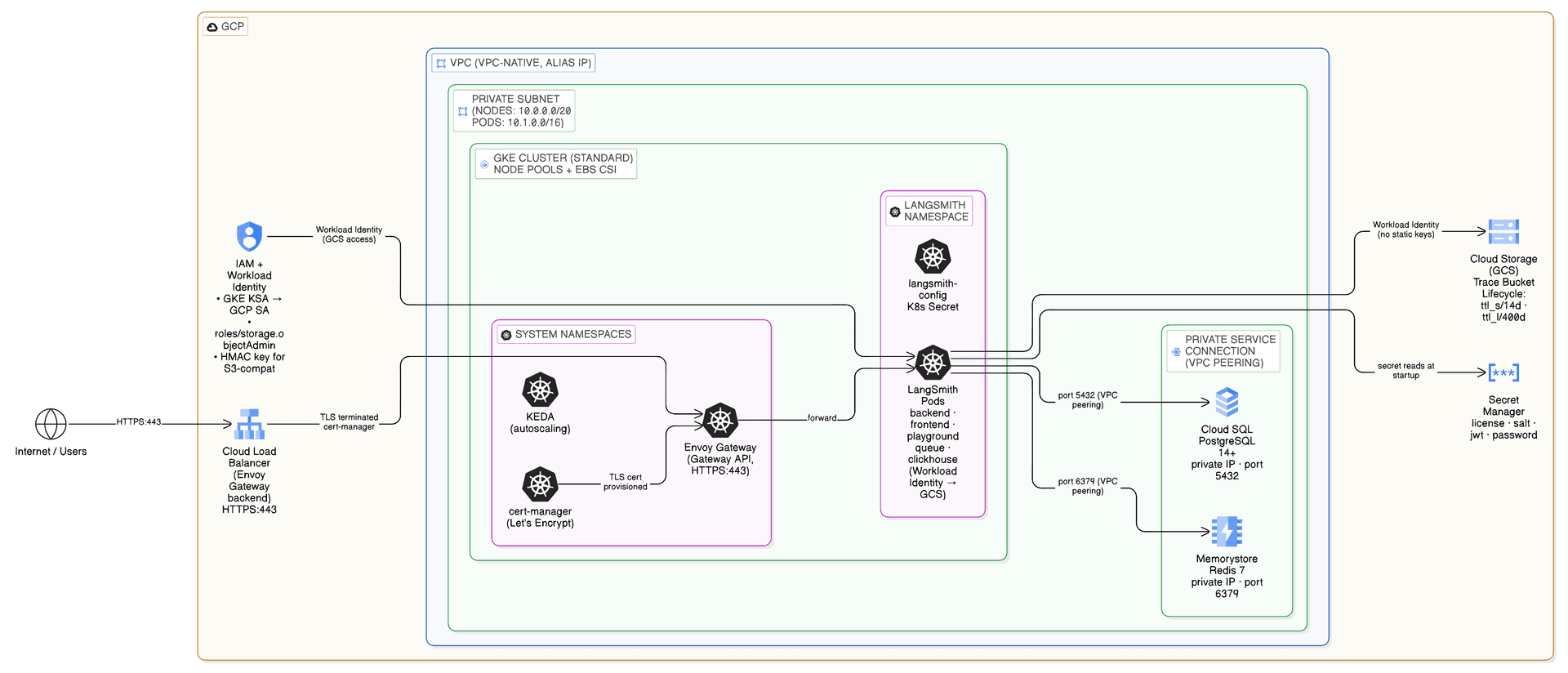
Workload Identity
GKE pods authenticate to GCS using Workload Identity — the Kubernetes service account is annotated with a GCP service account email via an IAM binding. For GCS via the S3-compatible API, HMAC credentials are passed through Helm values. No static GCP service account keys are stored in Kubernetes secrets.
Private connectivity
Cloud SQL and Memorystore are accessible only via private IP within the VPC. A private service connection (VPC peering to Google's managed network) is established during Pass 1. No public endpoints are created for database or cache resources.
Envoy Gateway
Ingress is handled by Envoy Gateway (Gateway API). TLS is terminated at the Gateway using certificates issued by cert-manager (Let's Encrypt HTTP01) or an existing certificate. The Gateway exposes a single external LoadBalancer IP — point your DNS A record here.
Variable Reference
| Variable | Default | Description |
|---|---|---|
project_id | required | GCP project ID where resources will be created |
region | us-west2 | GCP region for all resources |
zone | us-west2-a | GCP zone for zonal resources |
environment | prod | Environment label: dev, staging, prod, test, uat |
name_prefix | ls | Short prefix for all resource names (1–11 chars) |
unique_suffix | true | Append random suffix to resource names |
subnet_cidr | 10.0.0.0/20 | CIDR for the GKE subnet |
pods_cidr | 10.4.0.0/14 | CIDR for GKE pod IPs (secondary range) |
services_cidr | 10.8.0.0/20 | CIDR for GKE service IPs (secondary range) |
gke_use_autopilot | false | Use GKE Autopilot mode (managed node pools) |
gke_node_count | 2 | Initial node count per zone (Standard mode) |
gke_min_nodes | 2 | Minimum nodes per zone for autoscaling |
gke_max_nodes | 10 | Maximum nodes per zone for autoscaling |
gke_machine_type | e2-standard-4 | GKE node machine type (Standard mode only) |
gke_disk_size | 100 | Node disk size in GB |
gke_release_channel | REGULAR | GKE release channel: RAPID, REGULAR, or STABLE |
gke_deletion_protection | true | Enable deletion protection for GKE cluster |
gke_network_policy_provider | DATA_PLANE_V2 | Network policy: CALICO or DATA_PLANE_V2 |
postgres_source | external | external (Cloud SQL, private IP) or in-cluster |
postgres_version | POSTGRES_15 | PostgreSQL version for Cloud SQL |
postgres_tier | db-custom-2-8192 | Cloud SQL machine tier (2 vCPU, 8 GB RAM) |
postgres_disk_size | 50 | Cloud SQL disk size in GB |
postgres_high_availability | true | Enable Cloud SQL HA (regional standby) |
postgres_deletion_protection | true | Enable deletion protection on Cloud SQL |
postgres_password | required when external | PostgreSQL password — use TF_VAR_postgres_password |
redis_source | external | external (Memorystore, private IP) or in-cluster |
redis_version | REDIS_7_0 | Redis version for Memorystore |
redis_memory_size | 5 | Memorystore Redis memory size in GB |
redis_high_availability | true | Enable Memorystore HA tier (Standard HA) |
redis_prevent_destroy | false | Prevent accidental Terraform destroy of Redis |
clickhouse_source | in-cluster | in-cluster (dev/POC only), langsmith-managed (recommended for production), or external |
clickhouse_host | "" | ClickHouse host (required for external/managed) |
clickhouse_port | 9440 | ClickHouse native protocol port |
clickhouse_http_port | 8443 | ClickHouse HTTP port |
clickhouse_user | default | ClickHouse username |
clickhouse_tls | true | Enable TLS for ClickHouse connections |
storage_ttl_short_days | 14 | GCS TTL for ttl_s/ prefix (short-lived trace objects) |
storage_ttl_long_days | 400 | GCS TTL for ttl_l/ prefix (long-lived trace objects) |
storage_force_destroy | false | Allow bucket deletion even with objects inside |
langsmith_namespace | langsmith | Kubernetes namespace for LangSmith |
langsmith_domain | langsmith.example.com | Fully qualified domain name for LangSmith |
langsmith_license_key | "" | LangSmith license key — use TF_VAR_langsmith_license_key |
langsmith_helm_chart_version | "" | Pin a specific Helm chart version (empty = latest) |
install_ingress | true | Install Envoy Gateway ingress via Terraform |
ingress_type | envoy | envoy (implemented), istio, or other |
tls_certificate_source | none | none, letsencrypt, or existing |
letsencrypt_email | "" | Email for Let's Encrypt (required when tls_certificate_source = letsencrypt) |
tls_secret_name | langsmith-tls | Name for the TLS secret in Kubernetes |
sizing_profile | default | Helm sizing: production, production-large, dev, minimum, default |
enable_deployments | false | Enable LangSmith Deployments — installs KEDA, listener, operator, host-backend |
enable_agent_builder | false | Enable Agent Builder UI (requires enable_deployments = true) |
enable_insights | false | Enable ClickHouse-backed analytics |
enable_polly | false | Enable Polly AI eval/monitoring (requires enable_deployments = true) |
enable_usage_telemetry | false | Enable extended usage telemetry reporting |
owner | platform-team | Owner label applied to all resources |
cost_center | "" | Cost center label for billing attribution |
labels | {} | Additional labels applied to all resources |
Variable Reference
| Variable | Default | Required | Description |
|---|---|---|---|
project_id | — | yes | GCP project ID |
region | us-west2 | no | GCP region |
zone | us-west2-a | no | GCP zone for zonal resources |
environment | prod | no | Environment: dev, staging, prod, test, uat |
name_prefix | ls | no | Resource name prefix (1–11 chars) |
unique_suffix | true | no | Append random suffix to resource names |
subnet_cidr | 10.0.0.0/20 | no | CIDR for the GKE subnet |
pods_cidr | 10.4.0.0/14 | no | CIDR for GKE pods |
services_cidr | 10.8.0.0/20 | no | CIDR for GKE services |
gke_use_autopilot | false | no | Use GKE Autopilot mode |
gke_node_count | 2 | no | Initial node count per zone (Standard mode) |
gke_min_nodes | 2 | no | Minimum nodes per zone for autoscaling |
gke_max_nodes | 10 | no | Maximum nodes per zone for autoscaling |
gke_machine_type | e2-standard-4 | no | GKE node machine type |
gke_disk_size | 100 | no | Node disk size in GB |
gke_release_channel | REGULAR | no | GKE release channel: RAPID, REGULAR, STABLE |
gke_deletion_protection | true | no | Enable deletion protection on GKE cluster |
gke_network_policy_provider | DATA_PLANE_V2 | no | Network policy: CALICO or DATA_PLANE_V2 |
postgres_source | external | no | external (Cloud SQL) or in-cluster (Helm) |
postgres_version | POSTGRES_15 | no | PostgreSQL version for Cloud SQL |
postgres_tier | db-custom-2-8192 | no | Cloud SQL machine tier |
postgres_disk_size | 50 | no | Cloud SQL disk size in GB |
postgres_high_availability | true | no | Enable Cloud SQL HA (regional standby) |
postgres_deletion_protection | true | no | Enable deletion protection on Cloud SQL |
postgres_password | "" | when external | PostgreSQL password — use TF_VAR_postgres_password |
redis_source | external | no | external (Memorystore) or in-cluster (Helm) |
redis_version | REDIS_7_0 | no | Redis version for Memorystore |
redis_memory_size | 5 | no | Memorystore Redis memory size in GB |
redis_high_availability | true | no | Enable Memorystore HA tier (Standard HA) |
redis_prevent_destroy | false | no | Prevent accidental Terraform destroy of Redis |
clickhouse_source | in-cluster | no | in-cluster, langsmith-managed, or external |
clickhouse_host | "" | when external | ClickHouse host (external/managed only) |
clickhouse_port | 9440 | no | ClickHouse native protocol port |
clickhouse_http_port | 8443 | no | ClickHouse HTTP port |
clickhouse_user | default | no | ClickHouse username |
clickhouse_tls | true | no | Enable TLS for ClickHouse connections |
storage_ttl_short_days | 14 | no | GCS TTL for ttl_s/ prefix |
storage_ttl_long_days | 400 | no | GCS TTL for ttl_l/ prefix |
storage_force_destroy | false | no | Allow bucket deletion with objects inside |
langsmith_namespace | langsmith | no | Kubernetes namespace for LangSmith |
langsmith_domain | langsmith.example.com | no | Fully qualified domain name |
langsmith_license_key | "" | no | License key — use TF_VAR_langsmith_license_key |
langsmith_helm_chart_version | "" | no | Pin Helm chart version (empty = latest) |
install_ingress | true | no | Install Envoy Gateway via Terraform |
ingress_type | envoy | no | Ingress type: envoy, istio, or other |
tls_certificate_source | none | no | none, letsencrypt, or existing |
letsencrypt_email | "" | when letsencrypt | Email for Let's Encrypt notifications |
tls_secret_name | langsmith-tls | no | Name for the TLS secret in Kubernetes |
enable_langsmith_deployment | true | no | Enable LangSmith Deployments — installs KEDA |
owner | platform-team | no | Owner label applied to all resources |
cost_center | "" | no | Cost center label for billing attribution |
labels | {} | no | Additional labels applied to all resources |
Optional GCP modules
| Variable | Default | Description |
|---|---|---|
enable_gcp_iam_module | true | Wires modules/iam for Workload Identity + bucket IAM binding |
enable_secret_manager_module | false | Wires modules/secrets for Secret Manager bootstrap secret |
enable_dns_module | false | Wires modules/dns for Cloud DNS + managed cert |
dns_create_zone | true | Create a DNS zone when DNS module is enabled |
dns_existing_zone_name | "" | Existing zone to use when dns_create_zone = false |
dns_create_certificate | true | Create a Google-managed cert when DNS module is enabled |
Quick Reference
First-time setup
cd terraform/gcp

make quickstart              # generates terraform.tfvars interactively
source infra/scripts/setup-env.sh   # exports TF_VAR_* into shell (must be sourced)
make secrets                 # verify secrets stored correctly in Secret Manager
make init && make plan && make apply   # ~25–35 min
make kubeconfig
make init-values
make deploy
Day-2 operations
make status            # full deployment health check
make status-quick      # skip Secret Manager + K8s queries
make deploy            # re-deploy after changing Helm values or upgrading chart
make init-values       # re-generate values after Terraform changes
make kubeconfig        # refresh cluster credentials
make secrets           # manage Secret Manager secrets interactively (list/get/set/validate)
Pass summary
| Pass | What | Command |
|---|---|---|
| 1 | VPC + GKE + Cloud SQL + Memorystore + GCS + IAM + cert-manager + KEDA + Envoy Gateway | make apply |
| 1.5 | Cluster credentials | make kubeconfig |
| 2 | LangSmith Helm | make init-values && make deploy |
| 3 | + LangSmith Deployments — host-backend, listener, operator | make apply && make init-values && make deploy |
| 4 | + Agent Builder — tool-server, trigger-server + deep-agent LGP | make init-values && make deploy |
| 5 | + Insights + Polly — Clio analytics, Polly eval agent | make init-values && make deploy |
Enable optional addons
# infra/terraform.tfvars — set flags, then: make init-values && make deploy
enable_deployments   = true   # required for Agent Builder and Polly
enable_agent_builder = true   # requires enable_deployments = true
enable_insights      = true
enable_polly         = true   # requires enable_deployments = true + Polly entitlement
enable_usage_telemetry = true # optional extended telemetry
Sizing profiles
| Profile | When to use |
|---|---|
default | Chart defaults — quick tests, no sizing overlay applied |
minimum | Absolute floor — fits e2-standard-4; demos, CI smoke tests |
dev | Single replica, minimal resources — dev/CI environments |
production | Multi-replica with HPA — recommended for real workloads |
production-large | High-memory / high-CPU — 50+ users or 1000+ traces/sec |
# infra/terraform.tfvars — then: make init-values && make deploy
sizing_profile = "production"
Glossary
| Term | Meaning |
|---|---|
| values chain | deploy.sh loads Helm values files in order: base → overrides → sizing → addons. The last file wins on conflicts. |
| sizing profile | A pre-built Helm values file that sets resources, replicaCount, and HPA settings for all LangSmith components. Set via sizing_profile in terraform.tfvars. |
| enable_* flags | Boolean flags in terraform.tfvars that tell init-values.sh which addon values files to copy. No terraform apply needed for pure Helm addons — only make init-values && make deploy. |
| Workload Identity | GKE's mechanism for pods to authenticate to GCP APIs (GCS, Secret Manager) without static credentials. The K8s service account is annotated with a GCP service account email via an IAM binding. |
| Fernet keys | Symmetric encryption keys used by Agent Builder, Insights, and Polly to encrypt stored state. Generated once by setup-env.sh. Never rotate after first deploy — changing them permanently corrupts existing data. |
| values-overrides.yaml | The live, gitignored file generated by init-values.sh. Contains your hostname, Cloud SQL endpoint, Redis endpoint, GCS bucket, and Workload Identity config. Do not edit directly — re-run make init-values. |
| KEDA | Kubernetes Event-Driven Autoscaling — required for LangSmith Deployments (Pass 3). Installed via Terraform (k8s-bootstrap module) when enable_deployments = true. |