

Quickstart
Get from zero to a running LangSmith instance on AKS in under an hour.
# 1 — Unzip the Terraform modules provided by your LangChain SA
unzip azure.zip
cd azure
# 2 — Generate terraform.tfvars interactively
#     Re-running is safe — Enter accepts current values
make quickstart
# 3 — Bootstrap secrets from Key Vault
#     Prompts on first run, reads from Key Vault on repeat
make setup-env
# 4 — Check prerequisites (az CLI, resource providers, RBAC, quotas)
make preflight
# 5 — Deploy infrastructure (~15–20 min)
#     Skip make plan on a fresh deploy — kubernetes_manifest requires a live cluster
make init
make apply
# 6 — Configure kubectl and create K8s secrets
make kubeconfig
make k8s-secrets
# 7 — Deploy LangSmith (~10 min)
make init-values
make deploy
# 8 — Check status
make status

# Get the public IP from the ingress
kubectl get ingress -n langsmith
LangSmith on AzureSelf-hosted deployment on AKS, managed with Terraform.
Two deployment tiers
| Tier | Postgres | Redis | ClickHouse | Use case |
|---|---|---|---|---|
| Light | In-cluster pod | In-cluster pod | In-cluster pod | Demo / POC / short-lived dev |
| Production | Azure DB for PostgreSQL | Azure Cache for Redis Premium | LangChain Managed | Persistent, scalable deployments |
Azure resources created (Pass 1)
| Resource | Type | Purpose |
|---|---|---|
| Resource Group | azurerm_resource_group | Container for all resources |
| Virtual Network | azurerm_virtual_network | Isolated network (10.0.0.0/17) |
| AKS Cluster | azurerm_kubernetes_cluster | Kubernetes — all workloads run here |
| NGINX Ingress | Helm (ingress-nginx) | External load balancer + TLS termination |
| PostgreSQL Flexible Server | azurerm_postgresql_flexible_server | Org config, run metadata (production tier) |
| Redis Cache Premium | azurerm_redis_cache | Trace ingestion queue, pub/sub (production tier) |
| Blob Storage | azurerm_storage_account | Raw trace objects, TTL-tiered (always) |
| Managed Identity | azurerm_user_assigned_identity | Workload Identity for pod → Blob auth |
| Azure Key Vault | azurerm_key_vault | Stores all LangSmith secrets |
| cert-manager | Helm | Automated TLS certificate management |
| KEDA | Helm | Event-driven autoscaling for workers |
Prerequisites
Required tools
# Azure CLI (>= 2.50)
brew install azure-cli          # macOS
# Linux: https://learn.microsoft.com/en-us/cli/azure/install-azure-cli

# Terraform (>= 1.5)
brew tap hashicorp/tap && brew install hashicorp/tap/terraform

# kubectl
brew install kubectl

# Helm (>= 3.x)
brew install helm

# Verify versions
az version --output table
terraform version
kubectl version --client
helm version
Required accounts and access
| Requirement | Notes |
|---|---|
| Azure subscription | Owner or Contributor + User Access Administrator. Owner is required to create role assignments for Workload Identity. |
| LangSmith license key | Contact your LangChain sales representative. Required for self-hosted deployments. |
| DNS / hostname | A domain where you can create an A record (e.g. langsmith.example.com). Alternatively use sslip.io for quick testing — no DNS registration needed. |
Azure quota check
The default configuration uses Standard_D8s_v3 (8 vCPU, 32 GiB) for the default pool and Standard_D16s_v3 (16 vCPU, 64 GiB) for the large pool. Confirm sufficient quota before applying.
# Check Dsv3 family quota
az vm list-usage --location <region> \
  --query "[?contains(name.value,'standardDSv3')].{name:name.localizedValue,used:currentValue,limit:limit}" \
  -o table
Log in and set subscription
az login
az account show --query "{name:name, id:id, user:user.name}" -o table

# Switch subscriptions if needed
az account set --subscription "YOUR_SUBSCRIPTION_ID"
Preflight check (new machines and subscriptions)
Run make preflight from terraform/azure/ before your first make apply. It validates az CLI login, required Azure resource provider registrations (Microsoft.ContainerService, Microsoft.DBforPostgreSQL, etc.), RBAC roles (Contributor + User Access Administrator), and that terraform.tfvars is populated.
cd terraform/azure
make preflight
Repository Layout
terraform/azure/
├── Makefile                    # Task runner — start here (make help)
├── infra/                      # Terraform root module
│   ├── main.tf                 # Module wiring
│   ├── variables.tf            # All input variables with descriptions
│   ├── outputs.tf              # Outputs consumed by helm scripts
│   ├── terraform.tfvars.example
│   ├── secrets.auto.tfvars     # Generated by setup-env.sh — gitignored, never commit
│   └── scripts/
│       ├── _common.sh          # Shared helpers: _parse_tfvar, _tfvar_is_true, color output
│       ├── setup-env.sh        # Bootstrap secrets → writes secrets.auto.tfvars
│       ├── preflight.sh        # Validates az login, resource providers, RBAC, tfvars
│       ├── create-k8s-secrets.sh  # Key Vault → langsmith-config-secret
│       ├── status.sh           # 9-section health check (supports --quick)
│       └── clean.sh            # Remove all generated/sensitive local files after teardown
├── helm/
│   ├── scripts/
│   │   ├── deploy.sh           # Helm values chain deploy (base + overrides + sizing + addons)
│   │   ├── init-values.sh      # TF outputs → values-overrides.yaml; copies sizing + addon files
│   │   ├── get-kubeconfig.sh   # az aks get-credentials wrapper
│   │   ├── preflight-check.sh  # Tools check + cluster connectivity + Helm repo
│   │   └── uninstall.sh        # Clean Helm uninstall (Azure LB warning included)
│   └── values/
│       ├── values.yaml                              # Azure base config (NGINX, Blob WI) — tracked in git
│       ├── values-overrides.yaml                    # Live file — gitignored, generated by init-values.sh
│       └── examples/                               # Source templates — tracked in git
│           ├── langsmith-values.yaml                     # Annotated reference
│           ├── langsmith-values-sizing-minimum.yaml      # Absolute minimum resources
│           ├── langsmith-values-sizing-dev.yaml          # Dev / CI sizing
│           ├── langsmith-values-sizing-production.yaml   # Production (multi-replica + HPA)
│           ├── langsmith-values-sizing-production-large.yaml  # High-volume (~1000 traces/sec)
│           ├── langsmith-values-agent-deploys.yaml       # Pass 3 — LangSmith Deployments
│           ├── langsmith-values-agent-builder.yaml       # Pass 4 — Agent Builder
│           ├── langsmith-values-insights.yaml            # Pass 5 — Insights / Clio
│ └── langsmith-values-polly.yaml # Pass 5 — Pollymake targets. make init-values generates helm/values/values-overrides.yaml from Terraform outputs automatically — no manual placeholder substitution needed. make deploy runs helm upgrade --install with the full values chain.Terraform Module Reference
| Module | Description |
|---|---|
modules/networking/ | VNet with dedicated subnets for AKS, PostgreSQL, and Redis (PostgreSQL/Redis subnets only created when source = "external"). Multi-AZ zone configuration optional. |
modules/k8s-cluster/ | AKS cluster (Azure CNI, OIDC, Workload Identity) + NGINX ingress. Workload Identity federated credentials for all LangSmith service accounts are centralized here. |
modules/postgres/ | PostgreSQL 14 Flexible Server — private subnet, max_connections tuned, vector extensions. Provisioned only when postgres_source = "external". Multi-AZ and HA optional. |
modules/redis/ | Redis Cache Premium — private subnet, TLS port 6380. Provisioned only when redis_source = "external". |
modules/storage/ | Blob Storage account + container. Workload Identity federated credentials have moved to modules/k8s-cluster/. |
modules/keyvault/ | Azure Key Vault (RBAC mode). Stores all LangSmith secrets. Terraform is the sole writer — setup-env.sh only reads. |
modules/k8s-bootstrap/ | K8s namespace, service account (annotated for WI), cert-manager, KEDA, and K8s secrets for Postgres + Redis connection URLs. |
modules/waf/ | Azure WAF policy (OWASP 3.2 + bot protection). Enabled via create_waf = true. Independent of other modules — safe to add post-deploy. |
modules/diagnostics/ | Log Analytics workspace + diagnostic settings for AKS, Key Vault, and PostgreSQL. Enabled via create_diagnostics = true. Required for production observability and audit logging. |
modules/bastion/ | Jump VM for private AKS cluster access via az ssh vm. No public IP required. Enabled via create_bastion = true. |
modules/dns/ | Azure DNS zone + A record for custom domain. Enabled via create_dns_zone = true. The A record is only created once ingress_ip is set — first apply creates the zone only, then set the IP and re-apply. |
Configuration
Generate terraform.tfvars
The interactive wizard generates infra/terraform.tfvars by prompting for subscription, region, ingress controller, TLS approach, and sizing profile:
cd terraform/azure
make quickstart
Prefer to edit manually? Copy the example instead:
cp infra/terraform.tfvars.example infra/terraform.tfvars
vi infra/terraform.tfvars
Initialize Terraform
make initMinimum required values:
# ── Identity ─────────────────────────────────────────────────────────────
subscription_id = "YOUR_AZURE_SUBSCRIPTION_ID"

# ── Location ─────────────────────────────────────────────────────────────
location = "eastus"

# ── Naming / tagging ─────────────────────────────────────────────────────
identifier  = ""           # suffix appended to all resource names, e.g. -prod
environment = "dev"        # dev | staging | prod

# ── Deployment tier ───────────────────────────────────────────────────────
# Production (recommended):
postgres_source   = "external"    # Azure DB for PostgreSQL
redis_source      = "external"    # Azure Cache for Redis Premium
clickhouse_source = "in-cluster"  # ClickHouse in-cluster pod (always)

# Light / demo (all in-cluster — skip managed Postgres/Redis):
# postgres_source = "in-cluster"
# redis_source    = "in-cluster"

# ── PostgreSQL ────────────────────────────────────────────────────────────
postgres_admin_username = "langsmith"
# postgres_admin_password — set via setup-env.sh (written to secrets.auto.tfvars)

# ── LangSmith ────────────────────────────────────────────────────────────
langsmith_namespace = "langsmith"
langsmith_domain    = "langsmith.example.com"   # your FQDN

# ── TLS ───────────────────────────────────────────────────────────────────
tls_certificate_source = "letsencrypt"
letsencrypt_email      = "you@example.com"

# ── Deletion protection (disable for dev/test) ────────────────────────────
aks_deletion_protection      = false
postgres_deletion_protection = false
keyvault_purge_protection    = false
Bootstrap secrets with setup-env.sh
setup-env.sh writes a secrets.auto.tfvars file (gitignored, chmod 600) that Terraform picks up automatically. It prompts on the first run and reads silently from Key Vault on all subsequent runs.
# Run from terraform/azure/
make setup-envapi_key_salt, jwt_secret, and Fernet encryption keys locally. Writes everything to secrets.auto.tfvars.Subsequent runs (Key Vault exists): reads all secrets from Key Vault silently — no prompts, no generation. Overwrites
secrets.auto.tfvars with stable values from Key Vault. Terraform is the sole Key Vault writer../setup-env.sh.Pass 1 — Azure Infrastructure
cd terraform/azure
make setup-env    # prompts for secrets on first run, reads Key Vault on repeat
make preflight    # validates az CLI, providers, RBAC, tfvars
make init
make apply # ~15-20 minmake plan fails on a fresh deploy because kubernetes_manifest resources require a live cluster API during plan — which does not exist yet. Skip plan and run make apply directly. It handles resource ordering in three internal stages.Verify Terraform outputs
# View all outputs (run from terraform/azure/)
terraform -chdir=infra output

# Key outputs consumed by helm scripts
terraform -chdir=infra output -raw keyvault_name
terraform -chdir=infra output -raw storage_account_name
terraform -chdir=infra output -raw storage_container_name
terraform -chdir=infra output -raw storage_account_k8s_managed_identity_client_idpostgres_source = "in-cluster" and redis_source = "in-cluster", the postgres_connection_url and redis_connection_url outputs are empty — the Helm chart manages its own Postgres and Redis pods. For a full copy-paste walkthrough of the all-in-cluster deploy (sslip.io hostname, Let's Encrypt TLS, no external DBs), see terraform/azure/BUILDING_LIGHT_LANGSMITH.md.What Pass 1 provisions
Pass 1 creates all Azure infrastructure. No Kubernetes workloads are deployed yet — that happens in Pass 2.
| Resource | Type | Purpose |
|---|---|---|
| Resource Group | azurerm_resource_group | Container for all resources |
| Virtual Network | azurerm_virtual_network | Isolated network (10.0.0.0/17) |
| AKS Cluster | azurerm_kubernetes_cluster | Kubernetes — all workloads run here |
| Ingress Controller | Helm | External load balancer + TLS termination (nginx by default) |
| PostgreSQL Flexible Server | azurerm_postgresql_flexible_server | Org config, run metadata (external tier) |
| Redis Cache Premium | azurerm_redis_cache | Trace ingestion queue, pub/sub (external tier) |
| Blob Storage | azurerm_storage_account | Raw trace objects — always required |
| Managed Identity | azurerm_user_assigned_identity | Workload Identity for pod → Blob auth |
| Azure Key Vault | azurerm_key_vault | Stores all LangSmith secrets |
| cert-manager | Helm | Automated TLS certificate management |
| KEDA | Helm | Event-driven autoscaling for workers |
Step 1 — Configure terraform.tfvars
Run the interactive wizard from terraform/azure/:
cd terraform/azure
make quickstart
The wizard generates infra/terraform.tfvars covering: subscription, region, naming, AKS sizing, ingress controller, DNS/TLS, backend services, Key Vault, and security add-ons. Each section includes explanatory context and cost estimates.
Prefer to edit manually? Copy the example instead:
cp infra/terraform.tfvars.example infra/terraform.tfvars
vi infra/terraform.tfvars
Minimum required values:
# ── Identity ─────────────────────────────────────────────────────────────
subscription_id = "YOUR_AZURE_SUBSCRIPTION_ID"

# ── Location ─────────────────────────────────────────────────────────────
location = "eastus"

# ── Naming / tagging ─────────────────────────────────────────────────────
identifier  = "-prod"      # suffix appended to all resource names
environment = "prod"       # dev | staging | prod

# ── Deployment tier ───────────────────────────────────────────────────────
# Production (recommended):
postgres_source   = "external"    # Azure DB for PostgreSQL
redis_source      = "external"    # Azure Cache for Redis Premium
clickhouse_source = "in-cluster"  # in-cluster (dev/POC) or external (prod)

# ── DNS + TLS ────────────────────────────────────────────────────────────
dns_label              = "langsmith-prod"   # → langsmith-prod.eastus.cloudapp.azure.com
tls_certificate_source = "letsencrypt"
letsencrypt_email      = "you@example.com"

# ── Sizing ────────────────────────────────────────────────────────────────
sizing_profile = "production"   # minimum | dev | production | production-large
Step 2 — Bootstrap secrets
make setup-env
setup-env.sh writes infra/secrets.auto.tfvars (gitignored, chmod 600) — Terraform picks this file up automatically, no shell exports needed.
- First run: prompts for PostgreSQL password, LangSmith license key, admin password, and admin email. Generates
api_key_salt,jwt_secret, and four Fernet encryption keys locally. - Subsequent runs: reads all values silently from Azure Key Vault — no prompts.
make setup-env.
Step 3 — Preflight check
make preflight
Validates before you spend 20 minutes on a failing apply:
azCLI version and active login- Active subscription — prints name so you can confirm it is correct
- 11 required Azure resource providers registered (
Microsoft.ContainerService,Microsoft.DBforPostgreSQL,Microsoft.Cache,Microsoft.KeyVault,Microsoft.Storage, and others) - RBAC: requires Contributor + User Access Administrator (or Owner) at subscription scope
terraform.tfvarsexists withlocationandsubscription_idsetsecrets.auto.tfvarsexists and has a non-emptylangsmith_license_keyterraform,kubectl, andhelmbinaries on PATH
Step 4 — Initialize Terraform
make init
Downloads the AzureRM provider, initializes the backend, and updates module sources. Required once per fresh clone and after any provider version change.
Step 5 — Apply infrastructure
make apply # ~15–20 min on first run
make plan fails on a fresh deploy because kubernetes_manifest resources require a live cluster API during plan — which does not exist yet. Skip plan and run make apply directly. It handles resource ordering in three internal stages: Azure resources → AKS → K8s bootstrap.
make apply creates all Azure resources in the correct order. On first run this takes approximately 15–20 minutes. Subsequent applies (e.g. enabling Pass 3) are much faster.
Step 6 — Pass 1.5: Cluster access and K8s secrets
After make apply completes, get cluster credentials and push secrets into the cluster:
make kubeconfig    # fetches AKS credentials, merges into ~/.kube/config
make k8s-secrets   # Key Vault → langsmith-config-secret in the langsmith namespace
make k8s-secrets reads 8 secrets from Key Vault and creates or updates langsmith-config-secret. Safe to re-run — uses --dry-run=client | kubectl apply so it updates in place without recreating the secret.
Verify Pass 1
# All nodes should be Ready
kubectl get nodes

# Bootstrap components — all Running
kubectl get pods -n cert-manager     # 3 pods
kubectl get pods -n keda             # 3 pods
kubectl get pods -n ingress-nginx    # 1 pod (if using nginx)

# NGINX LoadBalancer — save the EXTERNAL-IP
kubectl get svc ingress-nginx-controller -n ingress-nginx

# Workload Identity service account — should have client-id annotation
kubectl get sa langsmith-ksa -n langsmith \
  -o jsonpath='{.metadata.annotations}'

# View all Terraform outputs
terraform -chdir=infra output

# Key outputs consumed by Helm scripts
terraform -chdir=infra output -raw keyvault_name
terraform -chdir=infra output -raw storage_account_name
terraform -chdir=infra output -raw storage_container_name
terraform -chdir=infra output -raw storage_account_k8s_managed_identity_client_id
Or run everything — cluster credentials, K8s secrets, Helm values generation, and deploy — in one shot after make apply:
make deploy-all # kubeconfig → k8s-secrets → init-values → deploy
Teardown
Always uninstall Helm before destroying infrastructure:
make uninstall   # removes Helm releases, LGP CRD, langsmith namespace (removes Azure Load Balancer)
make destroy     # terraform destroy — safe now that LB is gone
make clean       # removes local secrets, generated values, local tfstate (LAST)
make uninstall first.
Pass 1.5 — Cluster Access + K8s Secrets
# Run from terraform/azure/
make kubeconfig    # wraps az aks get-credentials, reads cluster/RG names from terraform output
make k8s-secrets   # Key Vault → langsmith-config-secret in the langsmith namespace
make k8s-secrets reads 8 secrets from Key Vault and creates or updates langsmith-config-secret. It is safe to re-run — uses --dry-run=client | kubectl apply so it updates in place. langsmith-postgres-secret and langsmith-redis-secret are already created by Terraform (Pass 1).
Verify cluster is healthy
kubectl get nodes

# Workload Identity service account (should have client-id annotation)
kubectl get sa langsmith-ksa -n langsmith \
  -o jsonpath='{.metadata.annotations}'

# cert-manager (3 pods Running)
kubectl get pods -n cert-manager

# KEDA (3 pods Running)
kubectl get pods -n keda

# NGINX — save the EXTERNAL-IP for the hostname
kubectl get svc ingress-nginx-controller -n ingress-nginxNGINX_IP=$(kubectl get svc ingress-nginx-controller -n ingress-nginx -o jsonpath='{.status.loadBalancer.ingress[0].ip}')
HOSTNAME="${NGINX_IP//./-}.sslip.io"
echo "Hostname: $HOSTNAME"<ip-with-dashes>.sslip.io to the IP automatically — no DNS setup required.Pass 1.6 — TLS ClusterIssuer
How you create the cert-manager ClusterIssuer depends on tls_certificate_source:
| Value | How ClusterIssuer is created | Recommended for |
|---|---|---|
letsencrypt (default) ⭐ | Automatic — make deploy creates it via kubectl apply | Quick deploy, demo/POC, any hostname without DNS zone |
dns01 | Automatic — Terraform creates it in Pass 1 | Custom domain with Azure DNS zone (create_dns_zone = true) |
none | Skip — no TLS | Bring your own TLS |
HTTP-01 with Azure Public IP DNS label (letsencrypt — recommended quick path)
Set dns_label in terraform.tfvars to get a free Azure subdomain (<label>.<region>.cloudapp.azure.com) — no DNS registration required:
dns_label        = "langsmith-<identifier>"   # → langsmith-<identifier>.eastus.cloudapp.azure.com
tls_certificate_source = "letsencrypt"
letsencrypt_email      = "you@example.com"
make deploy automatically handles both steps for HTTP-01:
- Annotates the NGINX LoadBalancer service with
service.beta.kubernetes.io/azure-dns-label-name— this is what makes the Azure DNS label resolve to your public IP. - Creates the
letsencrypt-prodClusterIssuer viakubectl apply(idempotent — skipped if already present).
make deploy (deploy.sh). You do not need to run kubectl apply -f letsencrypt-issuers.yaml manually. kubernetes_manifest cannot be used in Terraform for this — it requires a live k8s API during terraform plan, which does not exist on a fresh deploy.# After make deploy — verify the ClusterIssuer and DNS label are in place
kubectl get clusterissuer letsencrypt-prod
# NAME READY AGE
# letsencrypt-prod True 30s
kubectl get svc ingress-nginx-controller -n ingress-nginx \
-o jsonpath='{.metadata.annotations.service\.beta\.kubernetes\.io/azure-dns-label-name}'
# Expected: langsmith-<identifier>DNS-01 (dns01 — automatic, custom domain)
When tls_certificate_source = "dns01", Terraform creates the letsencrypt-prod ClusterIssuer automatically during Pass 1. cert-manager uses Azure Workload Identity to manage DNS TXT records — no static service principal required.
Required variables in terraform.tfvars:
tls_certificate_source          = "dns01"
letsencrypt_email               = "you@example.com"
create_dns_zone                 = true
dns_zone_name                   = "langsmith.mycompany.com"
dns_resource_group_name         = "langsmith-rg<identifier>"
# cert_manager_identity_client_id is wired automatically from k8s-cluster output# After terraform apply — verify ClusterIssuer was created
kubectl get clusterissuer letsencrypt-prodPass 2 — LangSmith Base Platform
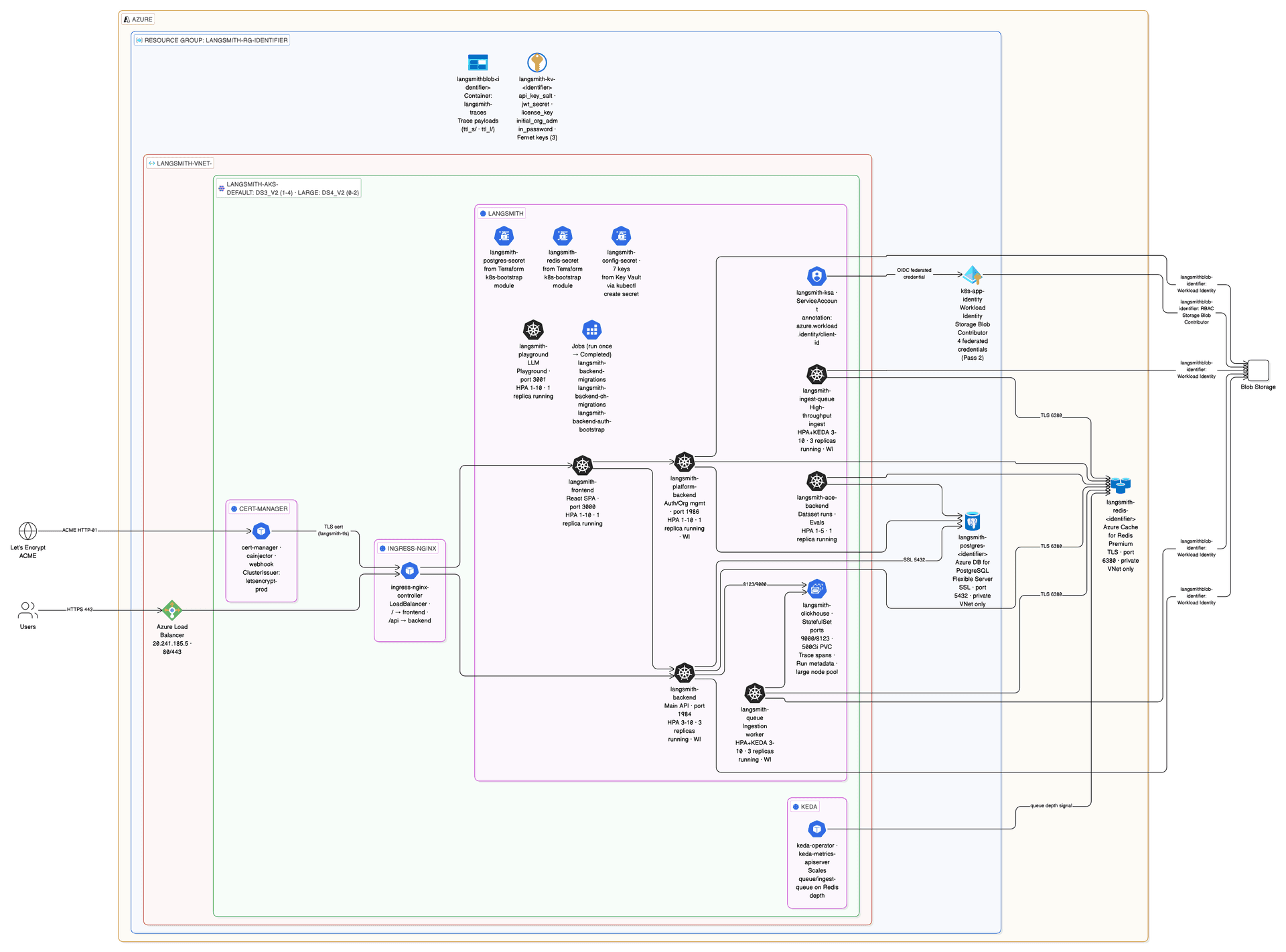
2a — Generate Helm values
Run from terraform/azure/:
make init-valuesReads terraform output and terraform.tfvars and generates helm/values/values-overrides.yaml with all placeholders filled: hostname, storage account name, Workload Identity client ID, DB connection references, ingress/TLS block, and service account annotations. Also copies the sizing overlay and any enabled addon overlays from examples/.
langsmith_admin_email in terraform.tfvars (set during make setup-env) and written into values-overrides.yaml automatically. No manual editing of the generated file is needed.2b — Deploy LangSmith
make deployRuns the full values chain: values.yaml → values-overrides.yaml → sizing overlay → any enabled addon overlays. Annotates the NGINX LoadBalancer with the Azure DNS label, creates the letsencrypt-prod ClusterIssuer if needed, and runs helm upgrade --install with --timeout 20m.
Or run Pass 1.5 + Pass 2 in one shot after make apply:
make deploy-all # kubeconfig → k8s-secrets → init-values → deploylangsmith-backend-auth-bootstrap Job runs DB migrations and org initialization as a post-install hook. This takes up to 5 minutes on first install. Without a long timeout, helm may report failure even though the install eventually succeeds. See issue #4.# macOS — install watch first
brew install watch
watch kubectl get pods -n langsmith
# Without watch
while true; do clear; kubectl get pods -n langsmith; sleep 3; done2c — Verify
kubectl get pods -n langsmith      # all Running or Completed
kubectl get ingress -n langsmith   # host + TLS assigned
kubectl get certificate -n langsmith  # READY: True
Expected pod state (all Running after ~5 minutes):
langsmith-ace-backend-xxxxx              1/1   Running     0   5m
langsmith-backend-xxxxx                  1/1   Running     0   5m
langsmith-backend-xxxxx                  1/1   Running     0   5m
langsmith-backend-xxxxx                  1/1   Running     0   5m
langsmith-backend-auth-bootstrap-xxxxx   0/1   Completed   0   5m
langsmith-backend-ch-migrations-xxxxx    0/1   Completed   0   5m
langsmith-backend-migrations-xxxxx       0/1   Completed   0   5m
langsmith-clickhouse-0                   1/1   Running     0   5m
langsmith-frontend-xxxxx                 1/1   Running     0   5m
langsmith-ingest-queue-xxxxx             1/1   Running     0   5m  (×3)
langsmith-platform-backend-xxxxx         1/1   Running     0   5m
langsmith-playground-xxxxx               1/1   Running     0   5m
langsmith-queue-xxxxx                    1/1   Running     0   5m  (×3)
Open https://<HOSTNAME> and log in with initialOrgAdminEmail + admin password from Key Vault.
Pass 2 pod resource reference
| Pod | CPU req/limit | Mem req/limit | HPA min/max | WI |
|---|---|---|---|---|
langsmith-backend | 1000m / 2000m | 2Gi / 4Gi | 3 / 10 | ✓ |
langsmith-platform-backend | 500m / 1000m | 1Gi / 2Gi | 1 / 10 | ✓ |
langsmith-frontend | 500m / 1000m | 1Gi / 2Gi | 1 / 10 | — |
langsmith-playground | 500m / 1000m | 1Gi / 2Gi | 1 / 10 | — |
langsmith-queue | 1000m / 2000m | 2Gi / 4Gi | 3 / 10 | ✓ |
langsmith-ingest-queue | 1000m / 2000m | 2Gi / 4Gi | 3 / 10 | ✓ |
langsmith-ace-backend | 500m / 1000m | 1Gi / 2Gi | 1 / 5 | — |
langsmith-clickhouse | 3500m / 8000m | 15Gi / 32Gi | StatefulSet | — |
HPA scales on CPU ≥ 50% or Memory ≥ 80%. KEDA additionally scales queue and ingest-queue on Redis queue depth.
What Pass 2 deploys
Pass 2 installs the LangSmith Helm chart. It reads all secrets from langsmith-config-secret (created in Pass 1.5) and all infrastructure configuration from Terraform outputs.
Prerequisites: Pass 1 complete (make apply) and Pass 1.5 complete (make kubeconfig && make k8s-secrets).
Two deployment paths
| Path | Command | When to use |
|---|---|---|
| Helm path (default) | make init-values && make deploy | Interactive output, kubeconfig refresh, pre-flight checks. Best for first-time deploys and day-2 re-deploys. |
| Terraform path | make init-app && make apply-app | Helm release + K8s secrets + Workload Identity SA managed in Terraform state. Best for GitOps and CI/CD pipelines. |
Helm path (recommended)
Step 1 — Generate Helm values
cd terraform/azure
make init-values
make init-values reads terraform output and terraform.tfvars and generates helm/values/values-overrides.yaml with all fields populated:
config.hostname— your FQDN (fromdns_labelorlangsmith_domain)config.initialOrgAdminEmail— the first org admin accountconfig.existingSecretName: langsmith-config-secret— secrets referenceconfig.blobStorage— storage account name + container + Workload Identity client ID- Workload Identity annotations for 5 service accounts (backend, platform-backend, queue, ingest-queue, host-backend)
- Ingress + TLS block (cert-manager annotation, TLS secret name)
- Postgres and Redis external secret references (if
postgres_source = "external"/redis_source = "external")
Also copies the sizing overlay and any enabled addon overlays from helm/values/examples/ into helm/values/.
langsmith_admin_email in terraform.tfvars (set during make setup-env) and written into values-overrides.yaml automatically. No manual editing needed.
Step 2 — Deploy LangSmith
make deploy # ~10 min
make deploy handles:
- Validates
values-overrides.yamlexists (fails fast withmake init-valueshint if missing) - Refreshes kubeconfig via
az aks get-credentials - Annotates the LoadBalancer service with
service.beta.kubernetes.io/azure-dns-label-name— required for Azure to assign the DNS label to the public IP - Creates the
letsencrypt-prodcert-manager ClusterIssuer iftls_certificate_source = "letsencrypt"(idempotent) - Runs preflight checks: kubectl, helm, az, terraform on PATH; cluster connectivity; Helm repo updated
- Verifies
langsmith-config-secretexists — auto-creates from Key Vault if missing - Builds and logs the values chain:
values.yaml→values-overrides.yaml→ sizing overlay → addon overlays - Guards against stuck Helm releases: auto-rolls back
pending-upgradestate before proceeding - Runs
helm upgrade --install langsmith langchain/langsmith --timeout 20m - Waits for core deployments to roll out
- Annotates the
langsmith-ksaservice account with the Workload Identity client ID - Prints the access URL and login credentials location
Or run Pass 1.5 + Pass 2 in one shot after make apply:
make deploy-all # kubeconfig → k8s-secrets → init-values → deploy
langsmith-backend-auth-bootstrap Job runs DB migrations and org initialization as a post-install hook. This takes up to 5 minutes on first install. Without a long timeout, helm may report failure even though the install eventually succeeds.
# macOS
brew install watch
watch kubectl get pods -n langsmith

# Without watch
while true; do clear; kubectl get pods -n langsmith; sleep 3; done
Terraform path (alternative)
Use the Terraform path when you want the Helm release, K8s secrets, and Workload Identity service account managed in Terraform state.
# Copy and configure app vars
cp app/terraform.tfvars.example app/terraform.tfvars
vi app/terraform.tfvars   # set admin_email at minimum

# Pull infra outputs into app/infra.auto.tfvars.json + terraform init
make init-app

# Deploy Helm release + K8s secrets + WI service account via Terraform
make apply-app
Feature flags in app/terraform.tfvars:
sizing              = "production"   # minimum | dev | production | production-large
enable_agent_deploys  = true         # Pass 3 — LangSmith Deployments
enable_agent_builder  = true         # Pass 4 — Agent Builder (requires agent_deploys)
enable_insights       = true         # Pass 5 — Insights / ClickHouse
enable_polly          = true         # Pass 5 — Polly (requires agent_deploys)
End-to-end via Terraform (Pass 1 + Pass 2 in one shot):
make deploy-all-tf # apply → init-values → init-app → apply-app
Verify Pass 2
# All pods Running or Completed (~17 pods)
kubectl get pods -n langsmith

# Ingress host + TLS assigned
kubectl get ingress -n langsmith

# TLS certificate issued
kubectl get certificate -n langsmith
# Expected: READY: True

# Helm release status
helm list -n langsmith
Expected pod state (all Running after ~5 minutes):
langsmith-ace-backend-xxxxx              1/1   Running     0   5m
langsmith-backend-xxxxx                  1/1   Running     0   5m
langsmith-backend-auth-bootstrap-xxxxx   0/1   Completed   0   5m
langsmith-backend-ch-migrations-xxxxx    0/1   Completed   0   5m
langsmith-backend-migrations-xxxxx       0/1   Completed   0   5m
langsmith-clickhouse-0                   1/1   Running     0   5m
langsmith-frontend-xxxxx                 1/1   Running     0   5m
langsmith-ingest-queue-xxxxx             1/1   Running     0   5m
langsmith-platform-backend-xxxxx         1/1   Running     0   5m
langsmith-playground-xxxxx               1/1   Running     0   5m
langsmith-queue-xxxxx                    1/1   Running     0   5m
Open https://<HOSTNAME> and log in with initialOrgAdminEmail and the admin password from Key Vault:
# Retrieve admin password
az keyvault secret show \
  --vault-name $(terraform -chdir=infra output -raw keyvault_name) \
  --name langsmith-admin-password \
  --query value -o tsv
Values chain
make deploy applies Helm values files in this order (last file wins on conflicts):
1. helm/values/values.yaml                             — Azure base (NGINX, Blob WI, no Istio)
2. helm/values/values-overrides.yaml                   — hostname, WI client-id, auth, postgres/redis
3. helm/values/langsmith-values-sizing-<profile>.yaml  — resource requests + HPA settings
4. (addon files — only when enable_* flags are set)
All files in helm/values/ are gitignored (generated or contain live secrets). Source templates live in helm/values/examples/ and are copied by make init-values.
Day-2 operations
make status         # 10-section health check
make status-quick   # skip Key Vault + K8s secret queries (faster)
make deploy         # re-deploy after any Helm value changes
make init-values    # re-generate values after Terraform changes
make kubeconfig     # refresh cluster credentials
make k8s-secrets    # re-create langsmith-config-secret from Key Vault
Pass 3 — LangSmith Deployments
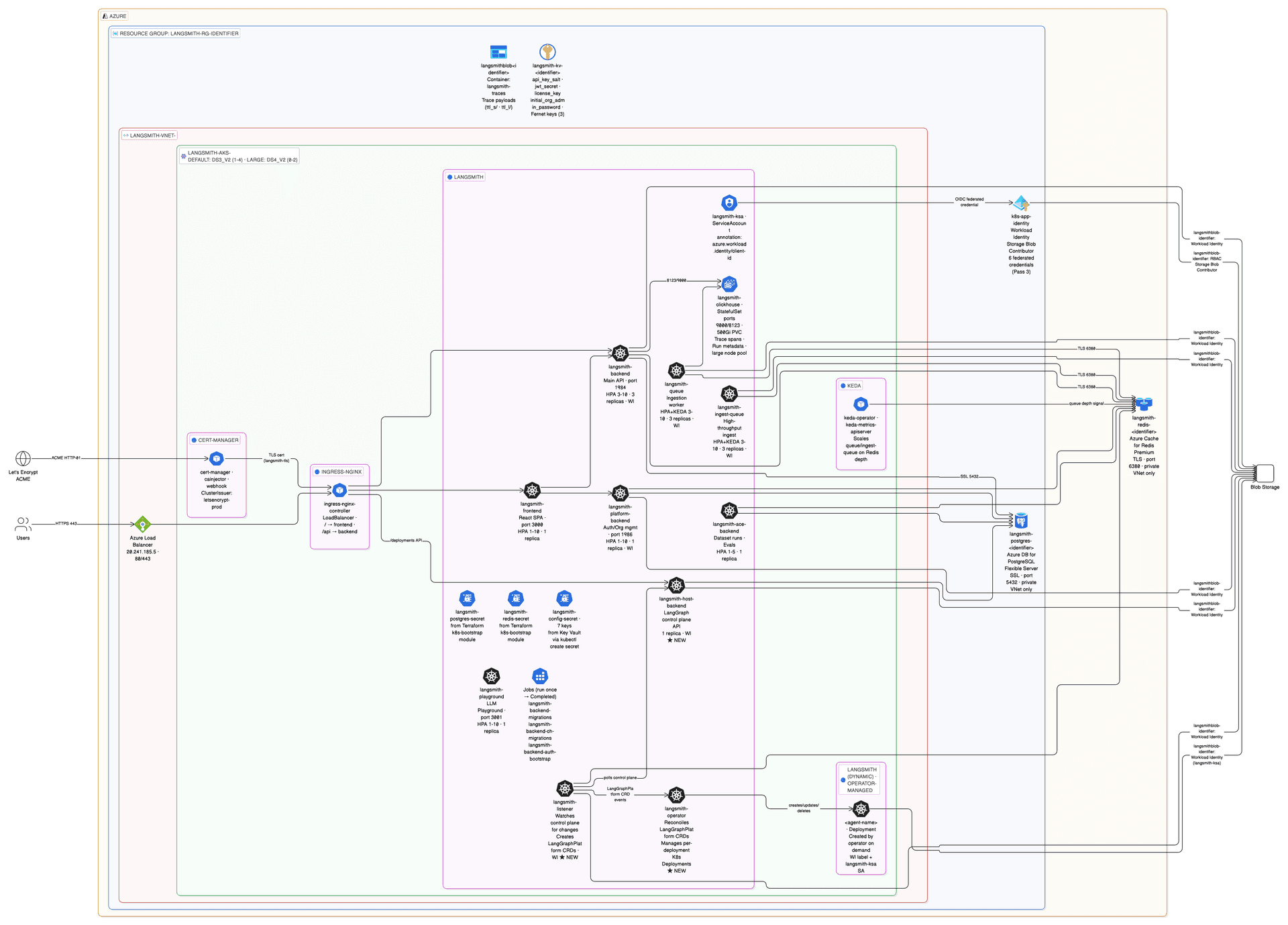
What gets added
| Pod | Role | WI |
|---|---|---|
langsmith-host-backend | LangGraph control plane API — manages deployment lifecycle, stores state in shared PostgreSQL | ✓ |
langsmith-listener | Watches host-backend, creates/updates LangGraphPlatform CRDs in Kubernetes | ✓ |
langsmith-operator | Reconciles CRDs — creates per-deployment K8s Deployments, StatefulSets, Services | — |
3a — Scale nodes, then enable in terraform.tfvars
Before enabling, bump default_node_pool_min_count to at least 5 — the operator spawns agent deployment pods on demand and needs node headroom.
# infra/terraform.tfvars
default_node_pool_min_count = 5      # operator pods need headroom
enable_deployments          = true
Then re-apply infra, regenerate values, and deploy:
# Run from terraform/azure/
make apply          # scale up node pool
make init-values    # picks up enable_deployments = true
make deploy         # rolls out host-backend + listener + operator
init-values appends the deployments addon overlay (langsmith-values-agent-deploys.yaml) to the values chain, which sets:
config:
  deployment:
    enabled: true                        # REQUIRED — without this, listener and operator are skipped silently
url: "https://<your-hostname>" # must match config.hostnameconfig.deployment.url must include https://DEPLOYING state. See issue #5.3b — Deploy
make deploy3c — Verify
kubectl get pods -n langsmith | grep -E "host-backend|listener|operator"
# Expected: all Running
kubectl get lgp -n langsmith          # list LangSmith Deployments
kubectl get crd | grep langchain      # operator CRDs registered
All three should be Running. Total pod count: ~20 Running + 3 Completed jobs.
config.deployment.enabled: true is requiredconfig.deployment.url without enabled: true causes the chart to silently skip creating listener and operator — no error, they just never appear. See issue #5.What Pass 3 adds
Pass 3 enables LangSmith Deployments — deploy and manage LangGraph graphs as API servers directly from the LangSmith UI. Three new pods are added to the cluster:
| Pod | Role | WI |
|---|---|---|
langsmith-host-backend | LangSmith Deployments control plane API — manages deployment lifecycle, stores state in shared PostgreSQL | ✓ |
langsmith-listener | Watches host-backend, creates/updates LangGraphPlatform CRDs in Kubernetes | ✓ |
langsmith-operator | Reconciles CRDs — creates per-deployment K8s Deployments, StatefulSets, Services | — |
Prerequisite: Pass 2 running.
Step 1 — Scale node pool
Before enabling, bump default_node_pool_min_count to at least 5. The operator spawns agent deployment pods on demand and needs node headroom:
# infra/terraform.tfvars
default_node_pool_min_count = 5      # operator pods need headroom
enable_deployments          = true
Pending state indefinitely. Scale the node pool first, then enable.
Step 2 — Apply, regenerate values, deploy
cd terraform/azure
make apply          # scale up node pool (~5 min)
make init-values    # picks up enable_deployments = true → generates addon overlay
make deploy         # rolls out host-backend + listener + operator
make init-values appends the LangSmith Deployments addon overlay (langsmith-values-agent-deploys.yaml) to the values chain. It automatically injects:
config:
  deployment:
    enabled: true                          # REQUIRED — without this, listener and operator are skipped silently
    url: "https://<your-hostname>"         # must match config.hostname (with protocol)
    tlsEnabled: true                       # set based on tls_certificate_source
DEPLOYING state indefinitely. The URL is injected automatically by make init-values — do not set it manually in the overlay file, as it will be overwritten.
config.deployment.url without enabled: true causes the chart to silently skip creating listener and operator — no error, they just never appear.
Step 3 — Verify
# All three pods Running
kubectl get pods -n langsmith | grep -E "host-backend|listener|operator"

# LangSmith Deployments CRDs registered
kubectl get crd | grep langchain

# List LangSmith Deployments (empty on first deploy — populated when you create a deployment)
kubectl get lgp -n langsmith
Expected: langsmith-host-backend, langsmith-listener, and langsmith-operator all Running. Total pod count: ~20 Running + 3 Completed jobs.
KEDA scaling for Deployments workers
KEDA is already installed in Pass 1. With enable_deployments = true, the operator creates KEDA ScaledObject resources for each agent deployment's worker queue. Worker pods scale down to zero when idle and scale up based on Redis queue depth.
No KEDA configuration is needed in terraform.tfvars — the operator manages it automatically when creating agent deployments.
Terraform path
If you are using the Terraform Helm path (Pass 2 via make apply-app), enable LangSmith Deployments in app/terraform.tfvars:
enable_agent_deploys = true
Then:
make init-app     # refresh infra outputs
make apply-app    # update Helm release
Pass 4 — Agent Builder
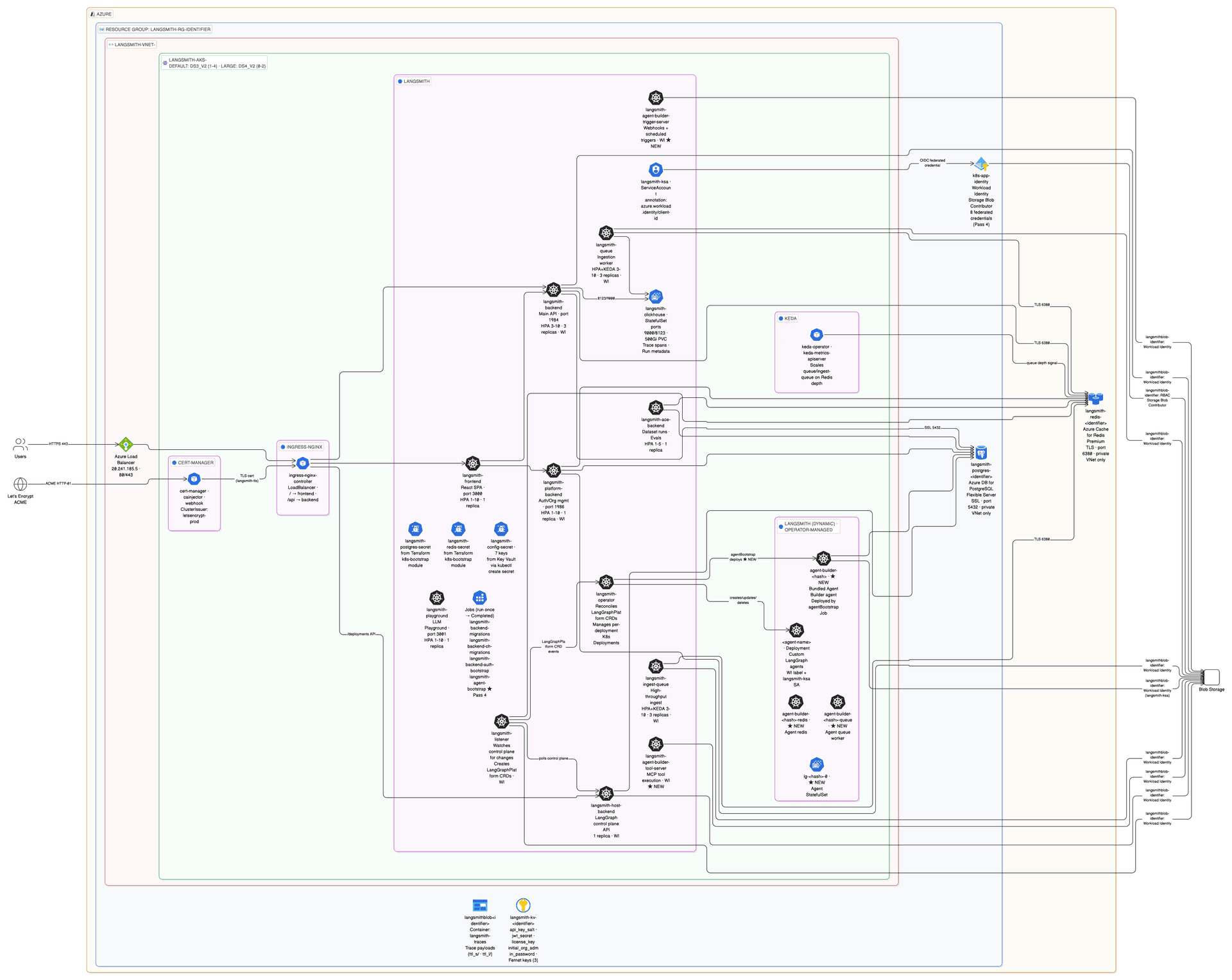
What gets added
| Pod | Type | Role |
|---|---|---|
langsmith-agent-builder-tool-server | Static | MCP tool execution server — code/file editing tools for the AI |
langsmith-agent-builder-trigger-server | Static | Webhook receiver and scheduled trigger engine |
langsmith-agent-bootstrap | Job (Completed) | Registers the bundled Agent Builder agent via the operator — runs once |
agent-builder-<hash> + queue + redis + lg-<hash>-0 | Dynamic (operator-managed) | Agent Builder agent deployment — created by operator when bootstrap Job runs |
4a — Enable in terraform.tfvars
Requires enable_deployments = true (Pass 3 must already be enabled).
# infra/terraform.tfvars
enable_deployments   = true
enable_agent_builder = true
Then regenerate values and deploy:
# Run from terraform/azure/
make init-values
make deploy
init-values appends the agent builder addon overlay (langsmith-values-agent-builder.yaml) to the values chain.
langsmith-config-secretconfig.agentBuilder.encryptionKey inline in values-overrides.yaml. The chart reads it from langsmith-config-secret via existingSecretName. Setting it inline would override the secret reference and create a mismatch. See issue #7.4b — Deploy
make deploy4c — Verify
kubectl get pods -n langsmith | grep agent-builder
# Expected: tool-server Running, trigger-server Running, agentBootstrap Completed

kubectl get pods -n langsmith | grep -E "tool-server|trigger-server|Bootstrap"
kubectl get lgp -n langsmith   # operator-managed Agent Builder deployment
Expected: 3 static pods (tool-server, trigger-server, bootstrap Job) + 4 dynamic pods (api-server, queue, redis, postgres StatefulSet). Total: ~26 pods.
After apply, an Agent Builder section appears in the LangSmith UI.
agentBootstrap Job creates the langsmith-polly-config ConfigMap that the frontend reads for the Polly UI. If the frontend was already running when bootstrap completed, Polly shows "Unable to connect to LangGraph server". Fix: kubectl rollout restart deployment langsmith-frontend -n langsmithWhat Pass 4 adds
Pass 4 enables the Agent Builder — visual AI-assisted creation and management of LangGraph agents from the LangSmith UI. No terraform apply is needed for this pass — it only requires make init-values && make deploy.
| Pod | Type | Role |
|---|---|---|
langsmith-agent-builder-tool-server | Static | MCP tool execution server — code/file editing tools for the AI |
langsmith-agent-builder-trigger-server | Static | Webhook receiver and scheduled trigger engine |
langsmith-agent-bootstrap | Job (Completed) | Registers the bundled Agent Builder agent via the operator — runs once |
agent-builder-<hash> + queue + redis + lg-<hash>-0 | Dynamic (operator-managed) | Agent Builder deployment — created by operator when bootstrap Job runs |
Prerequisite: Pass 3 must be enabled (enable_deployments = true). Pass 4 requires enable_deployments = true — enabling Agent Builder without Deployments causes a preflight error.
Step 1 — Enable in terraform.tfvars
# infra/terraform.tfvars
enable_deployments   = true    # Pass 3 — required prerequisite
enable_agent_builder = true    # Pass 4
Step 2 — Regenerate values and deploy
cd terraform/azure
make init-values    # appends langsmith-values-agent-builder.yaml to values chain
make deploy         # rolling update — ~10 min for bootstrap Job to complete
make init-values appends the Agent Builder addon overlay (langsmith-values-agent-builder.yaml) to the values chain. This overlay:
- Enables the Agent Builder UI and its two supporting services
- Sets
backend.agentBootstrap: true— a post-install job that registers Agent Builder as a LangSmith Deployment and creates the required ConfigMap - Sets conservative agent worker pod resources (1 CPU / 1 Gi) instead of the chart's default 4 CPU / 8 Gi
Step 3 — Verify
# Static pods Running, bootstrap Job Completed
kubectl get pods -n langsmith | grep -E "tool-server|trigger-server|Bootstrap"

# Operator-managed dynamic pods (4 pods — api-server, queue, redis, postgres StatefulSet)
kubectl get pods -n langsmith | grep agent-builder

# Operator-managed LangSmith Deployment for Agent Builder
kubectl get lgp -n langsmith
Expected: 3 static pods (tool-server, trigger-server, bootstrap Job) + 4 dynamic pods. Total: ~26 pods. After make deploy, an Agent Builder section appears in the LangSmith UI navigation.
agentBootstrap Job creates the langsmith-polly-config ConfigMap that the frontend reads for the Polly UI. If the frontend was already running when bootstrap completed, Polly shows "Unable to connect to LangGraph server". Fix:
kubectl rollout restart deployment langsmith-frontend -n langsmith
config.agentBuilder.encryptionKey inline in values-overrides.yaml. The chart reads it from langsmith-config-secret via existingSecretName. Setting it inline overrides the secret reference and creates a mismatch.
Workload Identity for Agent Builder
Both langsmith-agent-builder-tool-server and langsmith-agent-builder-trigger-server need Workload Identity to access Azure Blob Storage. Their federated credentials are pre-registered in modules/k8s-cluster/main.tf — no additional setup is needed.
If you add a new pod that needs Blob access, update service_accounts_for_workload_identity in modules/k8s-cluster/variables.tf and run terraform apply -target=module.aks.
Terraform path
If using the Terraform Helm path, enable in app/terraform.tfvars:
enable_agent_deploys  = true   # required prerequisite
enable_agent_builder  = true
Then:
make init-app
make apply-app
Pass 5 — Insights
Pass 5 adds a single flag to the Helm values — no new static pods. Clio deploys as a dynamic LangGraph deployment via the operator when first invoked from the UI.
5a — Enable in terraform.tfvars
Requires enable_deployments = true (Pass 3 must already be enabled).
# infra/terraform.tfvars
enable_deployments = true
enable_insights    = true
enable_polly       = true
Then regenerate values and deploy:
# Run from terraform/azure/
make init-values
make deploy
init-values appends the insights and polly addon overlays to the values chain.
5b — Deploy
make deploy5c — Verify
kubectl get pods -n langsmith | grep -E "clickhouse|polly|clio"
# ClickHouse already running from Pass 2; Insights operator deploys clio pods
kubectl get pods -n langsmith -w     # watch for new clio/analytics pods to come up

helm get values langsmith -n langsmith | grep -A3 insights
# Expected: enabled: true
Pod count after Pass 5 is identical to Pass 4 (~22 running). Clio appears as a dynamic pod when invoked from the UI.
insights_encryption_key and polly_encryption_key must never change after first enable — changing either breaks all existing encrypted data permanently. There is no recovery path.kubectl rollout restart deployment langsmith-frontend -n langsmithWhat Pass 5 adds
Pass 5 enables two features — Insights and Polly — both of which require Pass 3 (LangSmith Deployments). They are independent of each other: you can enable either one without the other.
Insights — AI-powered trace analytics (Clio). Surfaces patterns and anomalies in LangSmith traces. Clio deploys as a dynamic LangGraph deployment via the operator when first invoked from the UI. No new static pods are added.
Polly — AI-powered evaluation and monitoring agent. Runs as a dynamic LangGraph deployment. Sets resource limits for the Polly worker (2 CPU / 4 Gi request, 4 CPU / 8 Gi limit, scales 1–5 replicas).
No terraform apply is needed for Pass 5 — only make init-values && make deploy.
Prerequisite: Pass 3 must be enabled (enable_deployments = true). Pass 4 and Pass 5 are independent — both require Pass 3 but not each other.
Step 1 — Enable in terraform.tfvars
# infra/terraform.tfvars
enable_deployments = true    # Pass 3 — required prerequisite
enable_insights    = true    # Pass 5 — Insights / Clio analytics
enable_polly       = true    # Pass 5 — Polly AI evaluation agent
You can enable just one:
enable_insights = true    # Insights only (Polly not needed)
# or
enable_polly    = true    # Polly only (Insights not needed)
Step 2 — Regenerate values and deploy
cd terraform/azure
make init-values    # appends insights and polly addon overlays to values chain
make deploy         # rolling update — ~5 min
make init-values appends the addon overlays based on clickhouse_source in terraform.tfvars:
clickhouse_source = "in-cluster"→ generates a minimal overlay (config.insights.enabled: trueonly). The Helm chart manages ClickHouse internally.clickhouse_source = "external"→ generates a full overlay withclickhouse.external.enabled: trueand alangsmith-clickhousesecret reference. You must create this secret with the ClickHouse host and credentials before deploying.
helm/values/examples/langsmith-values-insights.yaml example has clickhouse.external.enabled: true and existingSecretName: langsmith-clickhouse. Manually copying it when using in-cluster ClickHouse causes CreateContainerConfigError because the secret doesn't exist. Always use make init-values to generate the correct file.
Step 3 — Verify
# ClickHouse already running from Pass 2
# Insights and Polly deploy as dynamic pods when first invoked from the UI
kubectl get pods -n langsmith | grep -E "clickhouse|polly|clio"

# Watch for dynamic pods when you first use Insights in the UI
kubectl get pods -n langsmith -w

# Confirm Insights is enabled in Helm values
helm get values langsmith -n langsmith | grep -A3 insights
# Expected: enabled: true
Pod count after Pass 5 is identical to after Pass 4 at rest (~22 running). Clio and Polly appear as dynamic pods when invoked from the UI.
insights_encryption_key and polly_encryption_key must never change after first enable. Changing either permanently corrupts all existing encrypted data. There is no recovery path. These keys are stored in Key Vault and never rotated automatically.
kubectl rollout restart deployment langsmith-frontend -n langsmith
Terraform path
If using the Terraform Helm path, enable in app/terraform.tfvars:
enable_agent_deploys = true   # required prerequisite
enable_insights      = true
enable_polly         = true
Then:
make init-app
make apply-app
All 5 passes summary
After completing all passes, your deployment runs:
| Pass | New pods | Total ~running |
|---|---|---|
| Pass 2 | Core LangSmith (backend, frontend, queue, ingest-queue, clickhouse, etc.) | ~17 |
| Pass 3 | host-backend, listener, operator | ~20 |
| Pass 4 | tool-server, trigger-server, bootstrap Job + 4 dynamic Agent Builder pods | ~26 |
| Pass 5 | No new static pods (Clio + Polly appear dynamically on first use) | ~22 at rest |
Light Deploy (All In-Cluster)
For demos, POCs, or short-lived dev environments, skip the managed Postgres and Redis. The Helm chart manages all in-cluster pods.
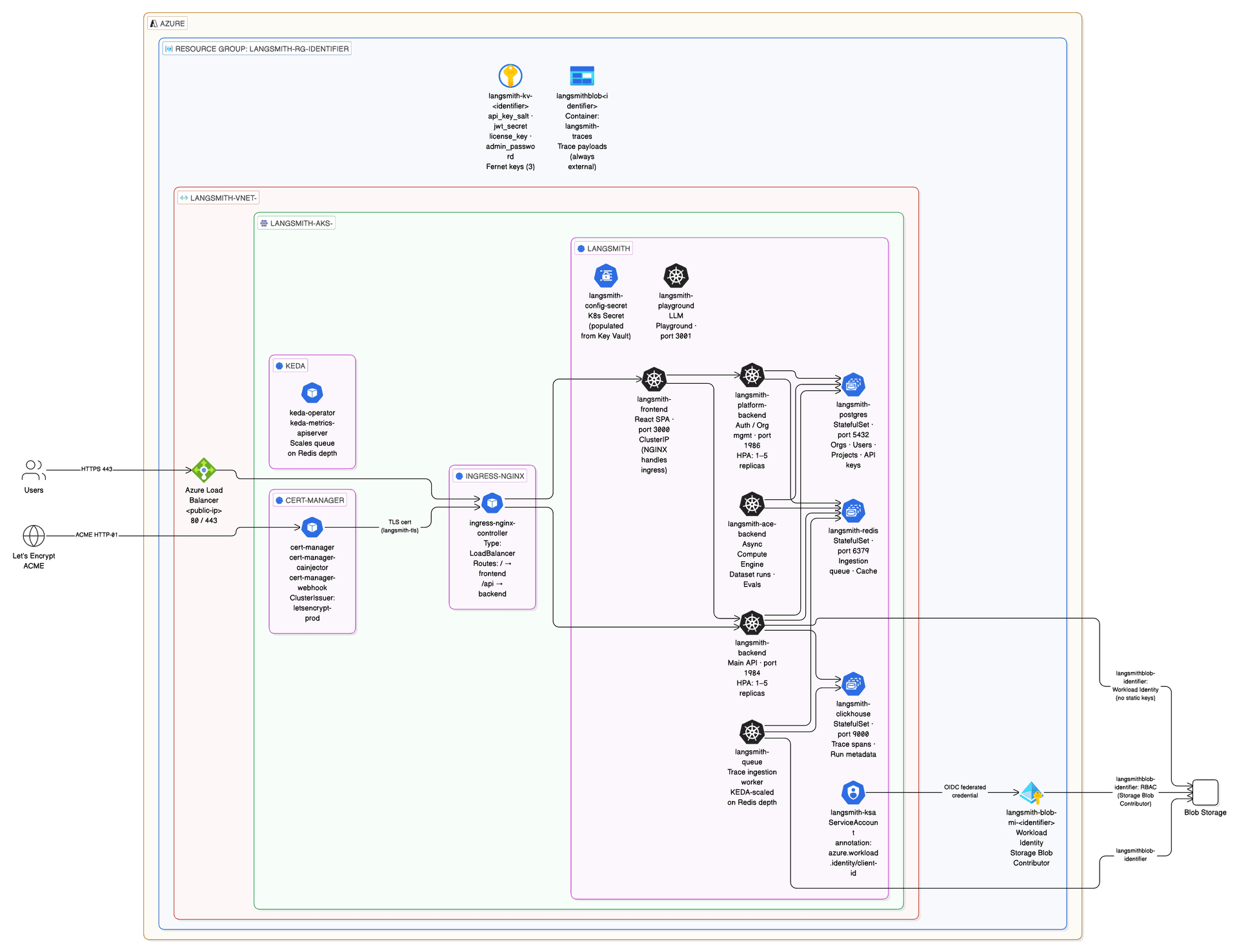
terraform.tfvars settings
postgres_source   = "in-cluster"
redis_source      = "in-cluster"
clickhouse_source = "in-cluster"
With these settings, no PostgreSQL or Redis subnets are created — the VNet contains only the AKS subnet. postgres_connection_url and redis_connection_url outputs are empty.
Helm values for light deploy
With postgres_source = "in-cluster" and redis_source = "in-cluster" set in terraform.tfvars, make init-values generates values-overrides.yaml without postgres/redis connection URL fields — the chart uses in-cluster pods instead.
# Run from terraform/azure/
make k8s-secrets
make init-values
make deploy
For a full copy-paste walkthrough of the all-in-cluster deploy (sslip.io hostname, Let's Encrypt TLS, no external DBs), see terraform/azure/BUILDING_LIGHT_LANGSMITH.md.
Bring Your Own VNet
If you have an existing VNet (e.g. connected via ExpressRoute or with custom firewall rules), skip VNet creation:
# terraform.tfvars
create_vnet        = false
vnet_id            = "/subscriptions/<sub-id>/resourceGroups/<rg>/providers/Microsoft.Network/virtualNetworks/<vnet>"
aks_subnet_id      = "/subscriptions/<sub-id>/.../subnets/<aks-subnet>"
postgres_subnet_id = "/subscriptions/<sub-id>/.../subnets/<postgres-subnet>"
redis_subnet_id    = "/subscriptions/<sub-id>/.../subnets/<redis-subnet>"
Subnet requirements
| Subnet | Requirement |
|---|---|
| AKS | /19 or larger. No delegation. Azure CNI assigns pod IPs from this range — each node consumes up to 30 pod IPs. |
| PostgreSQL | Any size. Must be delegated to Microsoft.DBforPostgreSQL/flexibleServers. No other resources. |
| Redis | /28 or larger. Must be exclusive to Redis (no other resources in the subnet). |
Terraform State Backend
For team use and production, store state in Azure Blob Storage.
az group create --name my-tfstate-rg --location eastus
az storage account create \
  --name mytfstateaccount \
  --resource-group my-tfstate-rg \
  --sku Standard_LRS
az storage container create \
  --name tfstate \
  --account-name mytfstateaccount
Uncomment and configure the backend block in terraform/azure/infra/backend.tf:
terraform {
  backend "azurerm" {
    resource_group_name  = "my-tfstate-rg"
    storage_account_name = "mytfstateaccount"
    container_name       = "tfstate"
    key                  = "langsmith.tfstate"
  }
}terraform init -reconfigureUpgrading LangSmith
# Check available versions
helm repo update
helm search repo langchain/langsmith --versions | head -10

# Upgrade via Makefile — re-generates values from current terraform outputs, then deploys
# Run from terraform/azure/
make deploydeployments_encryption_key, agent_builder_encryption_key, insights_encryption_key, and polly_encryption_key must stay stable across upgrades. They are stored in langsmith-config-secret from Key Vault — do not rotate them.# Check current deployed version
helm list -n langsmith
helm get metadata langsmith -n langsmithTeardown
make destroy first, it will stall. Always run make uninstall first. See issue #9.Always run in this order — never skip steps:
# Run from terraform/azure/
make uninstall   # removes Helm releases, LGP CRD, langsmith namespace (removes Azure Load Balancer)
make destroy     # terraform destroy — safe now that LB is gone
make clean # removes local secrets, generated values, local tfstate (LAST)make destroy permanently deletes the AKS cluster, PostgreSQL database (all data), Redis cache, and Blob Storage. Back up important data first.keyvault_purge_protection = false (the dev/test default), purge the soft-deleted vault after destroy to allow immediate name reuse:az keyvault purge --name langsmith-kv<identifier> --location <region>keyvault_purge_protection = true, the vault name is reserved for 90 days — you cannot reuse the same identifier until the hold expires.Architecture Overview
LangSmith on Azure uses AKS with Azure CNI (pods get VNet IPs), OIDC Workload Identity for keyless blob access, NGINX ingress with cert-manager TLS, and private-endpoint-only PostgreSQL and Redis.
Production Deploy (External Postgres + Redis)
Networking topology
| Subnet | CIDR | Contains |
|---|---|---|
| AKS nodes + pods | subnet-0 (10.0.0.0/19) | All Kubernetes workloads (Azure CNI) |
| PostgreSQL | subnet-postgres (10.0.32.0/20) | Azure DB for PostgreSQL Flexible Server (external tier only) |
| Redis | subnet-redis (10.0.48.0/20) | Azure Cache for Redis Premium (external tier only) |
All subnets are private. PostgreSQL and Redis are accessible only from within the VNet via private DNS resolution. No public endpoints.
Workload Identity (Blob Storage)
LangSmith pods access Azure Blob Storage without static keys. Azure AD token exchange via the AKS OIDC issuer:
| Step | What happens |
|---|---|
| 1 | Pod has label azure.workload.identity/use: "true" and service account annotation azure.workload.identity/client-id: <id> |
| 2 | AKS Workload Identity webhook injects AZURE_CLIENT_ID, AZURE_TENANT_ID, AZURE_FEDERATED_TOKEN_FILE |
| 3 | Pod presents K8s service account token to Azure AD OIDC endpoint |
| 4 | Azure AD issues short-lived access token for the Managed Identity |
| 5 | Pod reads/writes blobs — no static key in any secret or env var |
Which pods need Workload Identity
| Pod | Pass | Needs WI |
|---|---|---|
langsmith-backend | 2 | ✓ |
langsmith-platform-backend | 2 | ✓ |
langsmith-queue | 2 | ✓ |
langsmith-ingest-queue | 2 | ✓ |
langsmith-host-backend | 3 | ✓ |
langsmith-listener | 3 | ✓ |
langsmith-agent-builder-tool-server | 4 | ✓ |
langsmith-agent-builder-trigger-server | 4 | ✓ |
langsmith-frontend, langsmith-playground, langsmith-ace-backend, langsmith-clickhouse, langsmith-operator | 2–3 | — |
All federated credentials are pre-registered in modules/k8s-cluster/main.tf. Workload Identity is centralized in the cluster module — federated credentials, the managed identity, and the OIDC issuer configuration all live there. If you add a new pod that accesses blob storage, add its service account name to the service_accounts_for_workload_identity list and re-apply.
Key Vault Secret Management
Azure Key Vault (RBAC mode) stores all LangSmith secrets. Terraform is the sole writer. setup-env.sh only reads from Key Vault after Pass 1.
| Secret name in Key Vault | K8s secret key | Used by |
|---|---|---|
langsmith-api-key-salt | api_key_salt | API key hashing |
langsmith-jwt-secret | jwt_secret | Basic Auth sessions |
langsmith-license-key | langsmith_license_key | Enterprise license |
langsmith-admin-password | initial_org_admin_password | Initial org admin |
langsmith-deployments-encryption-key | deployments_encryption_key | Pass 3 Fernet encryption |
langsmith-agent-builder-encryption-key | agent_builder_encryption_key | Pass 4 Fernet encryption |
langsmith-insights-encryption-key | insights_encryption_key | Pass 5 Fernet encryption |
langsmith-polly-encryption-key | polly_encryption_key | Polly agent Fernet encryption |
# View Key Vault name (run from terraform/azure/)
terraform -chdir=infra output keyvault_name

# Read a secret directly
az keyvault secret show \
  --vault-name $(terraform -chdir=infra output -raw keyvault_name) \
  --name langsmith-api-key-salt \
  --query value -o tsv
Resource Sizing
AKS node pools
| Pool | VM Size | vCPU | RAM | Min | Max | Purpose |
|---|---|---|---|---|---|---|
| default | Standard_D8s_v3 | 8 | 32 GB | 1 | 10 | Core LangSmith services, system pods |
| large | Standard_D16s_v3 | 16 | 64 GB | 0 | 2 | ClickHouse (15 GB RAM request), LGP agent pods |
Recommended max_count by pass
| Pass | What's added | Recommended max_count |
|---|---|---|
| Pass 2 | Core LangSmith (external Postgres + Redis) | 4 |
| Pass 3 | host-backend, listener, operator | 4 |
| Pass 4 | Agent Builder tool + trigger server | 5–6 |
| Pass 5 | Clio (Insights) analytics pods | 6+ |
To increase capacity — update terraform.tfvars and re-apply:
default_node_pool_max_count = 6 # increase as needed# Run from terraform/azure/
make apply # AKS autoscaler picks up new max immediately — no node restartIP Address Plan
| Range | CIDR | Used by |
|---|---|---|
| VNet | 10.0.0.0/17 | All resources |
| AKS nodes + pods | 10.0.0.0/19 | Azure CNI pod IPs |
| PostgreSQL | 10.0.32.0/20 | Delegated subnet (external tier only) |
| Redis | 10.0.48.0/20 | Exclusive subnet (external tier only) |
| K8s ClusterIP | 10.0.64.0/20 | K8s service IPs (not in VNet) |
| K8s DNS | 10.0.64.10 | CoreDNS service IP |
Variable Reference
| Variable | Default | Description |
|---|---|---|
subscription_id | — | Azure subscription ID (required) |
location | eastus | Azure region |
identifier | "" | Suffix appended to all resource names (e.g. -prod, -dev-dz). Must start with a hyphen or be empty. Internal hyphens allowed. |
environment | dev | Environment tag on all resources |
owner | "" | Owner tag applied to all resources |
cost_center | "" | Cost center tag for billing attribution |
postgres_source | external | external = Azure DB for PostgreSQL (private VNet). in-cluster = Helm chart manages its own Postgres pod (dev/demo only). |
redis_source | external | external = Azure Cache for Redis (private VNet). in-cluster = Helm chart manages its own Redis pod (dev/demo only). |
clickhouse_source | in-cluster | in-cluster = ClickHouse deployed as Helm pod (dev/POC only). external = LangChain Managed ClickHouse (recommended for production). |
postgres_admin_username | langsmith | PostgreSQL admin username |
postgres_admin_password | "" | PostgreSQL admin password (sensitive). Set via setup-env.sh. |
postgres_subnet_address_prefix | ["10.0.32.0/20"] | CIDR for the PostgreSQL subnet |
redis_subnet_address_prefix | ["10.0.48.0/20"] | CIDR for the Redis subnet |
redis_capacity | 2 | Redis Cache tier (P2 = 13 GB) |
default_node_pool_vm_size | Standard_D8s_v3 | AKS node VM size (8 vCPU, 32 GB). Use Standard_D4s_v3 for light/demo only. |
default_node_pool_min_count | 1 | Min nodes for the default pool. Set to 3 for production (Pass 2 needs ~14.4 vCPU; 3× D8s_v3 provides 76% headroom). |
default_node_pool_max_count | 10 | Max nodes for autoscaler. Increase as needed per pass. |
sizing_profile | production | Helm sizing overlay: minimum | dev | production | production-large. Read by init-values.sh and deploy.sh — Terraform ignores this value. |
dns_label | "" | Azure Public IP DNS label for the ingress LoadBalancer. Works with nginx, istio, istio-addon, envoy-gateway. Results in <label>.<region>.cloudapp.azure.com. Leave empty to skip. |
additional_node_pools | large: D16s_v3 0–2 | Extra node pools. Default includes a large pool (Standard_D16s_v3, 16 vCPU, 64 GB) scaled to zero when idle. Required for ClickHouse (15 GB RAM request). |
aks_service_cidr | 10.0.64.0/20 | K8s ClusterIP range — must not overlap the VNet |
aks_dns_service_ip | 10.0.64.10 | CoreDNS service IP — must be within aks_service_cidr |
aks_deletion_protection | true | Prevent accidental AKS cluster deletion. Set false for dev/test. |
ingress_controller | nginx | Ingress controller type. nginx deploys NGINX via Helm in the ingress-nginx namespace. |
langsmith_namespace | langsmith | Kubernetes namespace for LangSmith workloads |
langsmith_release_name | langsmith | Helm release name (used for Workload Identity federated credential subjects) |
langsmith_domain | "" | Hostname for LangSmith (e.g. langsmith.example.com) |
langsmith_helm_chart_version | "" | Pin a specific Helm chart version. Empty = use latest. |
create_vnet | true | Create a new VNet. Set false to bring your own. |
vnet_id | "" | Existing VNet resource ID. Required when create_vnet = false. |
blob_ttl_enabled | true | Enable lifecycle TTL rules on blob container |
blob_ttl_short_days | 14 | TTL for short-lived trace blobs |
blob_ttl_long_days | 400 | TTL for long-lived trace blobs |
keyvault_name | "" | Override Key Vault name (default: langsmith-kv<identifier>) |
keyvault_purge_protection | true | Enable Key Vault purge protection. Disable before destroy to allow immediate name reuse. |
postgres_deletion_protection | true | Prevent accidental PostgreSQL server deletion. Set false for dev/test. |
tls_certificate_source | letsencrypt | letsencrypt = HTTP-01 via cert-manager (ClusterIssuer applied manually). dns01 = DNS-01 via Azure DNS + Workload Identity (ClusterIssuer created by Terraform). none = no TLS. |
letsencrypt_email | "" | Email for Let's Encrypt notifications. Required when tls_certificate_source is letsencrypt or dns01. |
cert_manager_identity_client_id | "" | Client ID of the cert-manager Managed Identity. Wired automatically from k8s-cluster output. Required when tls_certificate_source = "dns01". |
dns_zone_name | "" | Azure DNS zone name (e.g. langsmith.mycompany.com). Required when tls_certificate_source = "dns01". |
dns_resource_group_name | "" | Resource group containing the Azure DNS zone. Required when tls_certificate_source = "dns01". |
langsmith_license_key | "" | LangSmith enterprise license key (sensitive). Stored in Key Vault. |
langsmith_admin_password | "" | Initial admin password (sensitive). Stored in Key Vault as langsmith-admin-password. |
langsmith_api_key_salt | "" | Salt for hashing API keys (sensitive). Generated by setup-env.sh. Must stay stable. |
langsmith_jwt_secret | "" | JWT secret for Basic Auth sessions (sensitive). Generated by setup-env.sh. |
langsmith_deployments_encryption_key | "" | Fernet key for LangSmith Deployments (Pass 3). Generated by setup-env.sh. Must stay stable. |
langsmith_agent_builder_encryption_key | "" | Fernet key for Agent Builder (Pass 4). Generated by setup-env.sh. Must stay stable. |
langsmith_insights_encryption_key | "" | Fernet key for Insights (Pass 5). Generated by setup-env.sh. Must stay stable — changing it permanently corrupts existing insights data. |
langsmith_polly_encryption_key | "" | Fernet key for Polly agent. Stored in Key Vault as langsmith-polly-encryption-key. Must never change after first deploy — changing it breaks existing Polly data. |
create_waf | false | Enable Azure WAF policy (OWASP 3.2 + bot protection). Independent of other optional modules — safe to add post-deploy. |
create_diagnostics | false | Enable Log Analytics workspace + diagnostic settings for AKS, Key Vault, and PostgreSQL. Recommended for production observability and audit logging. |
enable_aks_diag | true | Create the AKS diagnostic setting inside the diagnostics module. Uses a boolean flag (not a resource ID check) because count must be known at plan time. |
enable_keyvault_diag | true | Create the Key Vault diagnostic setting inside the diagnostics module. |
enable_postgres_diag | false | Create the PostgreSQL diagnostic setting inside the diagnostics module. Set to true when postgres_source = "external". |
create_bastion | false | Enable a jump VM for private AKS cluster access via az ssh vm. No public IP required. |
create_dns_zone | false | Enable Azure DNS zone + A record. Use when you own a custom domain and want Azure to manage DNS resolution. Required for DNS-01 cert issuance. |
availability_zones | ["1"] | Availability zones for AKS node pools and PostgreSQL (e.g. ["1", "2", "3"]). Set to [] to disable zone pinning. |
postgres_standby_availability_zone | "" | Zone for the PostgreSQL standby replica (e.g. "2"). Set when enabling zone-redundant HA mode. |
enable_deployments | false | Pass 3 — enable LangSmith Deployments (host-backend, listener, operator). Read by deploy.sh — Terraform ignores this value. |
enable_agent_builder | false | Pass 4 — enable Agent Builder UI. Read by deploy.sh — Terraform ignores this value. Requires enable_deployments = true. |
enable_insights | false | Pass 5 — enable Insights / Clio. Read by deploy.sh — Terraform ignores this value. Requires enable_deployments = true. |
enable_polly | false | Pass 5 — enable Polly AI eval agent. Read by deploy.sh — Terraform ignores this value. Requires enable_deployments = true. |
Postgres Module Variables
| Variable | Default | Description |
|---|---|---|
database_name | langsmith | Name of the PostgreSQL database to create and use in the connection URL. The connection_url output uses this variable instead of a hardcoded database name. |
Core Variables
| Variable | Default | Description |
|---|---|---|
subscription_id | — | Azure subscription ID (required) |
location | eastus | Azure region |
identifier | "" | Suffix appended to all resource names (e.g. -prod, -dev-dz). Must start with a hyphen or be empty. |
environment | dev | Environment tag on all resources |
owner | "" | Owner tag applied to all resources |
cost_center | "" | Cost center tag for billing attribution |
Deployment Tier
| Variable | Default | Description |
|---|---|---|
postgres_source | external | external = Azure DB for PostgreSQL (private VNet). in-cluster = Helm chart manages its own Postgres pod (dev/demo only). |
redis_source | external | external = Azure Cache for Redis (private VNet). in-cluster = Helm chart manages its own Redis pod (dev/demo only). |
clickhouse_source | in-cluster | in-cluster = ClickHouse deployed as Helm pod (dev/POC only). external = LangChain Managed ClickHouse (recommended for production). |
PostgreSQL
| Variable | Default | Description |
|---|---|---|
postgres_admin_username | langsmith | PostgreSQL admin username |
postgres_admin_password | "" | PostgreSQL admin password (sensitive). Set via setup-env.sh. |
postgres_subnet_address_prefix | ["10.0.32.0/20"] | CIDR for the PostgreSQL subnet |
postgres_deletion_protection | true | Prevent accidental PostgreSQL server deletion. Set false for dev/test. |
database_name | langsmith | Name of the PostgreSQL database to create. Used in the connection_url output. |
Redis
| Variable | Default | Description |
|---|---|---|
redis_subnet_address_prefix | ["10.0.48.0/20"] | CIDR for the Redis subnet |
redis_capacity | 2 | Redis Cache tier (P2 = 13 GB) |
AKS Node Pools
| Variable | Default | Description |
|---|---|---|
default_node_pool_vm_size | Standard_D8s_v3 | AKS node VM size (8 vCPU, 32 GB). Use Standard_D4s_v3 for light/demo only. |
default_node_pool_min_count | 1 | Min nodes for the default pool. Set to 3 for production. Set to 5 before enabling Pass 3. |
default_node_pool_max_count | 10 | Max nodes for autoscaler. |
additional_node_pools | large: D16s_v3 0–2 | Extra node pools. Default includes a large pool (Standard_D16s_v3, 16 vCPU, 64 GB) scaled to zero when idle. Required for ClickHouse (15 GB RAM request). |
aks_service_cidr | 10.0.64.0/20 | K8s ClusterIP range — must not overlap the VNet. |
aks_dns_service_ip | 10.0.64.10 | CoreDNS service IP — must be within aks_service_cidr. |
aks_deletion_protection | true | Prevent accidental AKS cluster deletion. Set false for dev/test. |
availability_zones | ["1"] | Availability zones for AKS node pools (e.g. ["1", "2", "3"]). Set to [] to disable zone pinning. |
Ingress Controller
| Variable | Default | Description |
|---|---|---|
ingress_controller | nginx | Ingress controller: nginx | istio-addon | istio | agic | envoy-gateway. See INGRESS_CONTROLLERS.md for the full TLS compatibility matrix. |
DNS and TLS
| Variable | Default | Description |
|---|---|---|
dns_label | "" | Azure Public IP DNS label for the ingress LoadBalancer. Results in <label>.<region>.cloudapp.azure.com. Works with nginx, istio, istio-addon, envoy-gateway. |
langsmith_domain | "" | Custom hostname for LangSmith (e.g. langsmith.example.com). Takes priority over dns_label. |
tls_certificate_source | letsencrypt | letsencrypt = HTTP-01 via cert-manager. dns01 = DNS-01 via Azure DNS + Workload Identity. none = no TLS. |
letsencrypt_email | "" | Email for Let's Encrypt notifications. Required when tls_certificate_source is letsencrypt or dns01. |
cert_manager_identity_client_id | "" | Client ID of the cert-manager Managed Identity. Wired automatically from k8s-cluster output. Required when tls_certificate_source = "dns01". |
create_dns_zone | false | Enable Azure DNS zone + A record. Required for DNS-01 cert issuance. |
dns_zone_name | "" | Azure DNS zone name (e.g. langsmith.mycompany.com). Required when tls_certificate_source = "dns01". |
dns_resource_group_name | "" | Resource group containing the Azure DNS zone. Required when tls_certificate_source = "dns01". |
LangSmith Application
| Variable | Default | Description |
|---|---|---|
langsmith_namespace | langsmith | Kubernetes namespace for LangSmith workloads |
langsmith_release_name | langsmith | Helm release name (used for Workload Identity federated credential subjects) |
langsmith_helm_chart_version | "" | Pin a specific Helm chart version. Empty = use latest. |
sizing_profile | production | Helm sizing overlay: minimum | dev | production | production-large. Read by init-values.sh — Terraform ignores this value. |
Blob Storage
| Variable | Default | Description |
|---|---|---|
blob_ttl_enabled | true | Enable lifecycle TTL rules on the blob container |
blob_ttl_short_days | 14 | TTL for short-lived trace blobs |
blob_ttl_long_days | 400 | TTL for long-lived trace blobs |
Key Vault
| Variable | Default | Description |
|---|---|---|
keyvault_name | "" | Override Key Vault name (default: langsmith-kv<identifier>) |
keyvault_purge_protection | true | Enable Key Vault purge protection. Set false for dev/test to allow immediate name reuse after destroy. |
Network (BYO VNet)
| Variable | Default | Description |
|---|---|---|
create_vnet | true | Create a new VNet. Set false to bring your own. |
vnet_id | "" | Existing VNet resource ID. Required when create_vnet = false. |
High Availability
| Variable | Default | Description |
|---|---|---|
postgres_high_availability_mode | "" | PostgreSQL HA mode (e.g. ZoneRedundant). Requires GeneralPurpose or MemoryOptimized SKU. |
postgres_standby_availability_zone | "" | Zone for the PostgreSQL standby replica. Set when enabling zone-redundant HA. |
Optional Modules
| Variable | Default | Description |
|---|---|---|
create_waf | false | Enable Azure WAF policy (OWASP 3.2 + bot protection). Safe to add post-deploy. |
create_diagnostics | false | Enable Log Analytics workspace + diagnostic settings for AKS, Key Vault, and PostgreSQL. Recommended for production. |
enable_aks_diag | true | Create the AKS diagnostic setting inside the diagnostics module. |
enable_keyvault_diag | true | Create the Key Vault diagnostic setting inside the diagnostics module. |
enable_postgres_diag | false | Create the PostgreSQL diagnostic setting. Set true when postgres_source = "external". |
create_bastion | false | Enable a jump VM for private AKS cluster access via az ssh vm. No public IP required. |
Addon Pass Flags
These flags are read by init-values.sh and deploy.sh. Terraform ignores them — they only affect which Helm addon overlay files are generated.
| Variable | Default | Description |
|---|---|---|
enable_deployments | false | Pass 3 — enable LangSmith Deployments (host-backend, listener, operator). Scale default_node_pool_min_count to 5 first. |
enable_agent_builder | false | Pass 4 — enable Agent Builder UI. Requires enable_deployments = true. |
enable_insights | false | Pass 5 — enable Insights / Clio analytics. Requires enable_deployments = true. |
enable_polly | false | Pass 5 — enable Polly AI eval agent. Requires enable_deployments = true. |
Sensitive Variables (set via setup-env.sh)
These are written to secrets.auto.tfvars by make setup-env and stored in Azure Key Vault by Terraform. Never set these inline in terraform.tfvars.
| Variable | Description |
|---|---|
langsmith_license_key | LangSmith enterprise license key |
langsmith_admin_password | Initial org admin password |
langsmith_api_key_salt | Salt for hashing API keys — must stay stable after first deploy |
langsmith_jwt_secret | JWT secret for Basic Auth sessions |
langsmith_deployments_encryption_key | Fernet key for LangSmith Deployments (Pass 3) — must never change |
langsmith_agent_builder_encryption_key | Fernet key for Agent Builder (Pass 4) — must never change |
langsmith_insights_encryption_key | Fernet key for Insights (Pass 5) — must never change |
langsmith_polly_encryption_key | Fernet key for Polly — must never change |
Quick Reference
All commands run from terraform/azure/. Run make help to see the full target list. For copy-paste commands and expected outputs for each pass, see the Quick Reference page.
5-Pass deployment summary
| Pass | What | Make target |
|---|---|---|
| 1 | AKS + Postgres + Redis + Blob + Key Vault + cert-manager + KEDA | make apply |
| 1.5 | Cluster credentials + K8s secrets from Key Vault | make kubeconfig && make k8s-secrets |
| 2 | LangSmith Helm (~25 pods production) | make init-values && make deploy |
| 3 | + LangSmith Deployments (enable_deployments = true) — scale nodes to min 5 first | make apply && make init-values && make deploy |
| 4 | + Agent Builder (enable_agent_builder = true) | make init-values && make deploy |
| 5 | + Insights + Polly (enable_insights = true, enable_polly = true) | make init-values && make deploy |
Day-2 operations
make status         # 9-section health check
make status-quick   # skip Key Vault + K8s queries
make deploy         # re-deploy after Helm value changes
make init-values    # re-generate values after Terraform changes
make kubeconfig     # refresh cluster credentials
make k8s-secrets    # re-create langsmith-config-secret
Glossary
- values chain
- The ordered set of Helm
-ffiles loaded bydeploy.sh:values.yaml→values-overrides.yaml→ sizing file → addon files. Last file wins on conflicts. - sizing profile
- Controls resource requests/limits and HPA settings. Set via
sizing_profileinterraform.tfvars. Options:minimum,dev,production,production-large. Change by setting the flag and runningmake init-values && make deploy— noterraform applyneeded. - enable_* flags
- Boolean flags in
terraform.tfvarsthat control which addon Helm values filesinit-values.shgenerates (enable_deployments,enable_agent_builder,enable_insights,enable_polly). Noterraform applyneeded — they only affect Helm values. - langsmith-config-secret
- Kubernetes Secret in the
langsmithnamespace holding 8 application keys pulled from Key Vault. Created bymake k8s-secrets. The chart reads it viaconfig.existingSecretName: langsmith-config-secret. Keys:api_key_salt,jwt_secret,langsmith_license_key,initial_org_admin_password,deployments_encryption_key,agent_builder_encryption_key,insights_encryption_key,polly_encryption_key. - Workload Identity (WI)
- AKS OIDC issuer + Azure Managed Identity + federated credentials = pods access Azure Blob Storage without static credentials. No secrets in pods or env vars. All federated credentials are registered in
modules/k8s-cluster/main.tf. - Fernet keys
- Symmetric encryption keys used for Passes 3–5 data (
deployments_encryption_key,agent_builder_encryption_key,insights_encryption_key,polly_encryption_key). Generated once bysetup-env.shand stored in Key Vault. Must never change after first use — changing any of them permanently corrupts the data they protect. - sslip.io
- Free wildcard DNS service —
<ip-with-dashes>.sslip.ioresolves to the IP. Used for quick testing without a custom domain. No registration required. Example: NGINX IP20.1.2.3→ hostname20-1-2-3.sslip.io.
Known Issues
Click any issue to expand.
Diagnostic Commands
# Pod status
kubectl get pods -n langsmith
kubectl describe pod <pod-name> -n langsmith

# Logs
kubectl logs -n langsmith -l app=langsmith-backend --tail=100 -f
kubectl logs -n langsmith -l app=langsmith-platform-backend --tail=50

# Ingress + TLS
kubectl get ingress -n langsmith
kubectl get certificate -n langsmith
kubectl describe certificate -n langsmith

# Helm release status
helm list -n langsmith
helm get values langsmith -n langsmith
helm status langsmith -n langsmith
helm history langsmith -n langsmith

# Workload Identity check
kubectl get sa langsmith-ksa -n langsmith -o yaml | grep annotations -A3
kubectl exec -n langsmith deploy/langsmith-backend -- env | grep AZURE

# NGINX health probe
NGINX_IP=$(kubectl get svc ingress-nginx-controller -n ingress-nginx -o jsonpath='{.status.loadBalancer.ingress[0].ip}')
curl -s http://$NGINX_IP/nginx-health

# Key Vault — list all secrets (run from terraform/azure/)
az keyvault secret list --vault-name $(terraform -chdir=infra output -raw keyvault_name) -o table

# K8s secrets
kubectl get secrets -n langsmith | grep langsmith
kubectl get secret langsmith-config-secret -n langsmith -o jsonpath='{.data}' | python3 -m json.tool