
Architecture Reference
Platform layers, component overview, and infrastructure architecture for LangSmith on Azure.
Updated as deployment is validated.
Live Diagrams
Production Deploy (External Postgres + Redis)
LangSmith Azure — Production Architecture (v0.13.28)
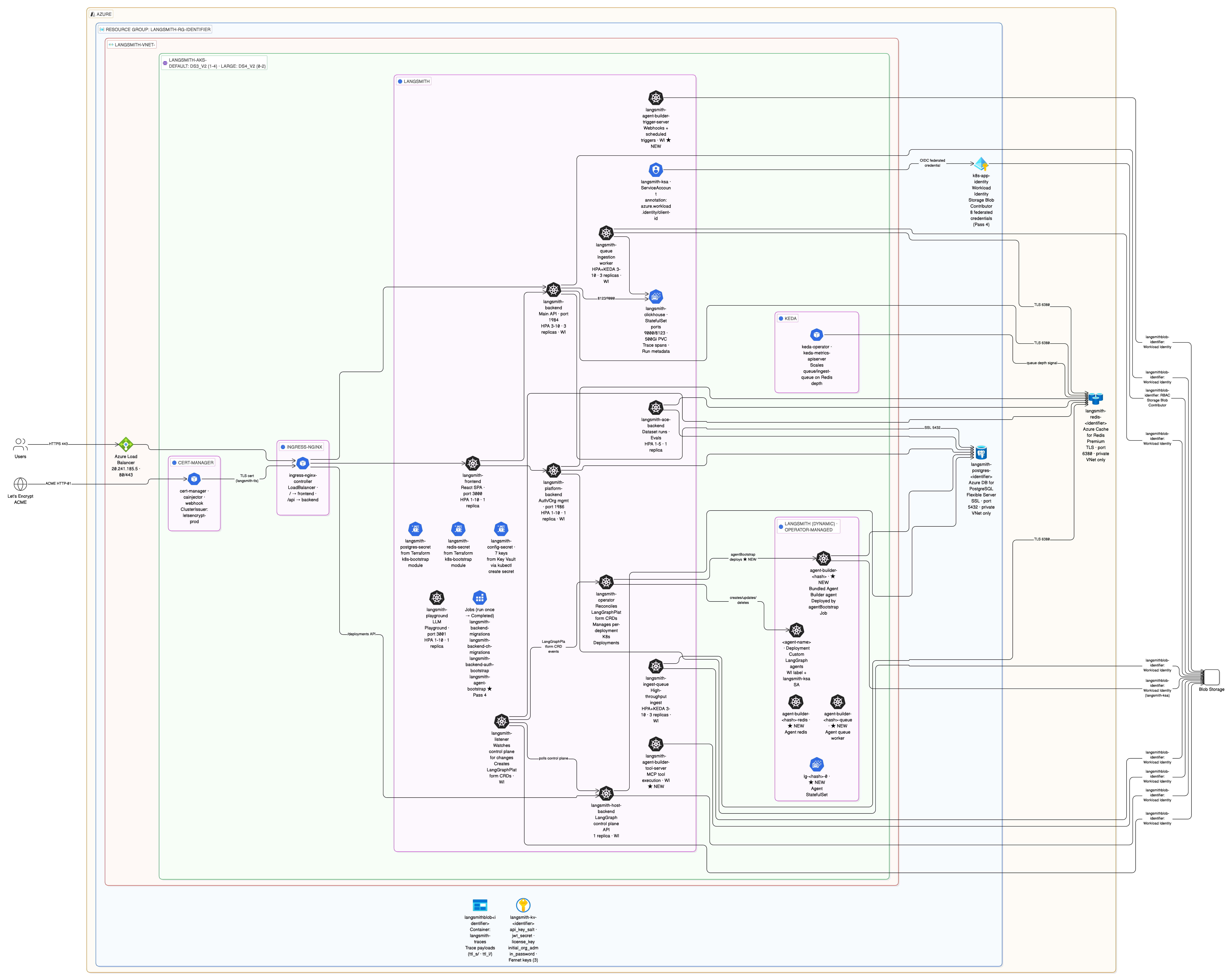
Full topology: all passes (2–4), AKS namespaces, pod names, external managed services, Workload Identity flow, Key Vault, TLS, KEDA, NGINX.
Pass 5 — Insights (verified)
No new diagram — Pass 5 adds config.insights.enabled: true only. Clio deploys lazily as a dynamic LangGraph deployment via the operator on first UI invocation. Pod topology at deploy time is identical to Pass 4.
Pass 4 — Agent Builder Containers (verified)
LangSmith Azure — Pass 4 Platform Containers (v0.13.28)
Adds to Pass 3 — 3 static + 4 dynamic pods:
langsmith-agent-builder-tool-server— MCP tool execution (WI)langsmith-agent-builder-trigger-server— webhooks + scheduled triggers (WI)langsmith-agent-bootstrap— one-time Job (Completed), registers bundled Agent Builder agentagent-builder-<hash>+queue+redis+lg-<hash>-0— operator-managed Agent Builder agent deployment (dynamic)
Pass 3 — LangGraph Platform Containers (verified)
LangSmith Azure — Pass 3 Platform Containers (v0.13.28)
Adds 3 pods to the Pass 2 topology:
langsmith-host-backend— LangGraph control plane API (WI)langsmith-listener— watches host-backend, creates LangGraphPlatform CRDs (WI)langsmith-operator— reconciles CRDs, manages per-deployment K8s Deployments- Dynamic agent Deployments created by operator in the same namespace, using
langsmith-ksa+ WI label
Pass 2 — Platform Containers (External Postgres + Redis, verified)
LangSmith Azure — Pass 2 Platform Containers (v0.13.28)
Exact pod topology from kubectl get pods -n langsmith after successful Pass 2 deploy:
- 7 Deployments: frontend, backend (×3), platform-backend, playground, ace-backend, queue (×3), ingest-queue (×3)
- 1 StatefulSet: clickhouse (large node pool, 500Gi PVC)
- 3 completed Jobs: backend-migrations, backend-ch-migrations, backend-auth-bootstrap
- External: Azure DB for PostgreSQL (subnet-postgres), Azure Cache for Redis Premium (subnet-redis)
- WI pods (4): backend, platform-backend, queue, ingest-queue
Light Deploy (All In-Cluster)
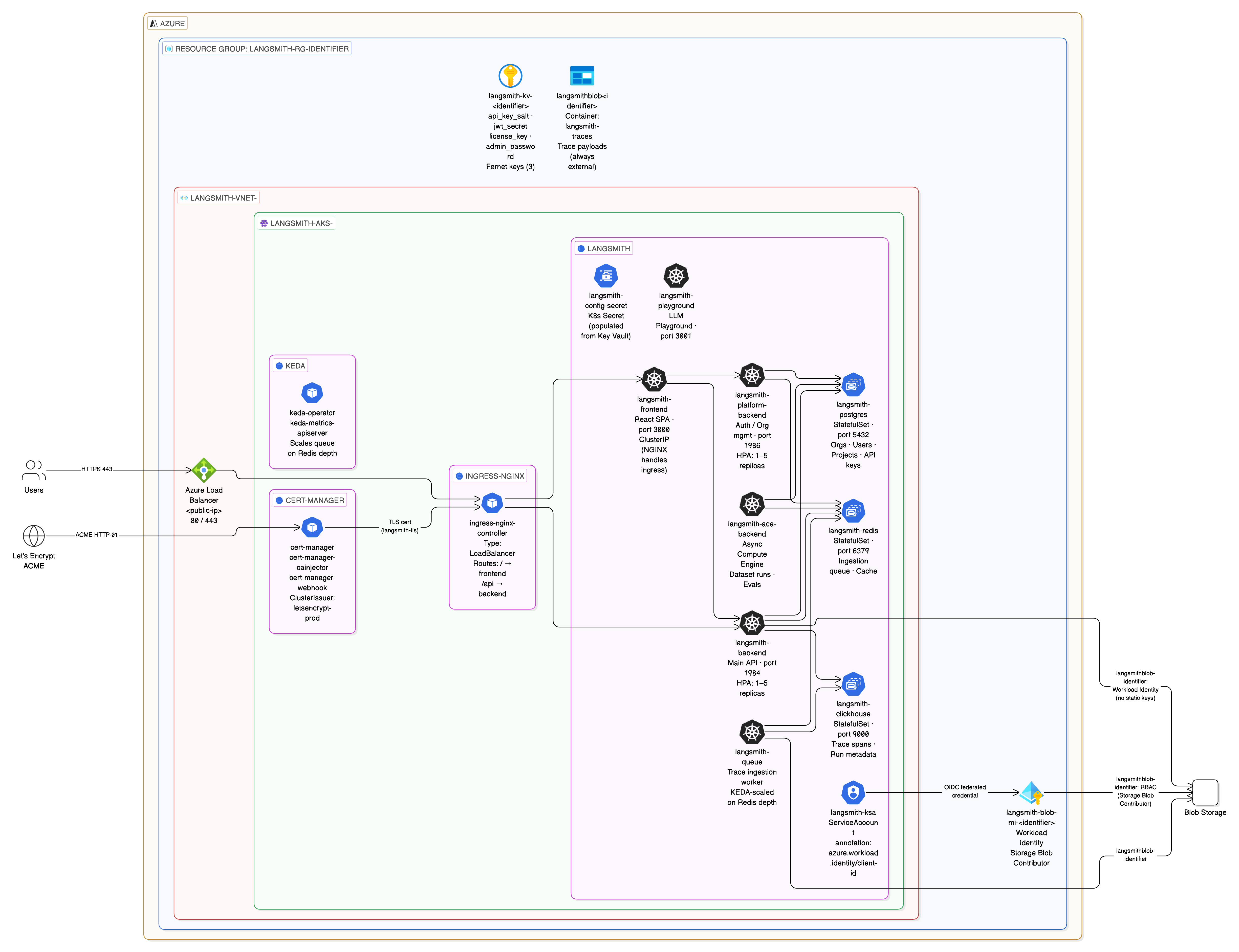
LangSmith Azure — Light Deploy Architecture (v0.13.28)
Deployment Paths
Pass 2 — Two ways to deploy the Helm chart
| Path | How | When to use |
|---|---|---|
| Helm path | make init-values && make deploy | Default. Shell script, interactive, reads TF outputs dynamically. Best for first deploys and day-2 re-deploys. |
| Terraform path | make init-app && make apply-app | Declarative. K8s secrets + langsmith-ksa SA + Helm release in Terraform state. Best for GitOps/CI pipelines. |
The Terraform path uses the app/ module. make init-app calls app/scripts/pull-infra-outputs.sh to read all infra outputs and write them into app/infra.auto.tfvars.json.
Ingress Options
| Controller | Variable | DNS label support | Notes |
|---|---|---|---|
nginx | ingress_controller = "nginx" | yes | Default. NGINX via Helm, standard Kubernetes Ingress. |
istio-addon | ingress_controller = "istio-addon" | yes | AKS managed Istio service mesh. Use istio_addon_revision to pin revision. |
istio | ingress_controller = "istio" | yes | Self-managed Istio via Helm. Full control over revision and config. |
envoy-gateway | ingress_controller = "envoy-gateway" | yes | Gateway API native. Uses envoyproxy/gateway-helm. |
none | ingress_controller = "none" | — | Bring your own ingress. |
Azure Public IP DNS labels (dns_label) work with all controllers. deploy.sh applies the service.beta.kubernetes.io/azure-dns-label-name annotation to the correct LoadBalancer service based on the chosen controller.
Deployment Topology
Phase 1 — Light (all in-cluster)
AKS Cluster
├── langsmith namespace
│   ├── frontend
│   ├── backend
│   ├── platform-backend
│   ├── playground
│   ├── queue
│   ├── ace-backend
│   ├── clickhouse (in-cluster pod)
│   ├── postgres   (in-cluster pod)
│   └── redis      (in-cluster pod)
├── ingress-nginx (Azure Load Balancer → NGINX)
└── cert-manager  (Let's Encrypt TLS)

Azure
├── Azure Blob Storage  (trace payloads — always external)
└── Azure Key Vault     (secrets)
Phase 2 — Production (external managed services)
AKS Cluster
├── langsmith namespace
│   ├── frontend / backend / platform-backend / playground / queue / ace-backend
│   └── clickhouse (in-cluster)
└── ingress-nginx + cert-manager

Azure Managed Services
├── Azure DB for PostgreSQL Flexible Server (private VNet)
├── Azure Cache for Redis Premium (private VNet)
├── Azure Blob Storage (Workload Identity — no static keys)
└── Azure Key Vault
Networking
Light deploy (postgres_source = "in-cluster", redis_source = "in-cluster")
langsmith-vnet<identifier>
└── subnet-0    (AKS nodes only)
    ↳ No Postgres/Redis subnets created — chart-managed pods handle both
Production (postgres_source = "external", redis_source = "external")
langsmith-vnet<identifier>
├── subnet-0              (AKS nodes)
├── subnet-postgres       (Azure DB for PostgreSQL Flexible Server)
└── subnet-redis          (Azure Cache for Redis Premium)
All subnets are private. Postgres and Redis are accessible only from within the VNet via private DNS resolution. No public endpoints.
Secret Flow
Pass 1 — Infrastructure

  ./setup-env.sh   (read-only against Key Vault — never writes to KV directly)
    First run:  prompts for postgres password, license key, admin password
                generates api_key_salt, jwt_secret, Fernet keys
                Key Vault does not exist yet → writes to local dot-files + secrets.auto.tfvars
    Subsequent: Key Vault exists → reads all secrets from KV → writes to secrets.auto.tfvars
                no prompts, no generation, no KV writes
    Output:     secrets.auto.tfvars  (gitignored, chmod 600)
                Terraform picks this up automatically — no shell session coupling

  terraform apply
    Reads:  terraform.tfvars (non-sensitive config)
            secrets.auto.tfvars (sensitive values — sole input for KV secret creation)
    Creates: Azure Key Vault + all secrets stored as KV secrets (Terraform is the sole KV writer)

Pass 2 — Application

  ./setup-env.sh   (re-run on any machine to refresh secrets.auto.tfvars from Key Vault)

  kubectl create secret generic langsmith-config-secret
    Reads:  Key Vault secrets + terraform outputs (postgres/redis URLs, blob account)
    Writes: K8s secrets — langsmith-config-secret, langsmith-postgres-secret,
                          langsmith-redis-secret

  helm upgrade --install langsmith ...
    chart reads config.existingSecretName = "langsmith-config-secret"
    no secrets inline in any YAML file
Key rule: secrets.auto.tfvars is never committed. It is regenerated from Key Vault on any machine by running ./setup-env.sh. Terraform is the sole writer to Key Vault — setup-env.sh only reads from it after the first apply.
Resource Sizing
Four sizing profiles are available. See helm/values/examples/SIZING.md for the full resource tables — CPU requests/limits, memory requests/limits, replica counts, and HPA ranges for every component across all four profiles.
| Profile | Use case | Set via |
|---|---|---|
minimum | Cost parking, CI smoke tests, single-user demos | sizing_profile = "minimum" in terraform.tfvars |
dev | Developer use, integration tests, POCs | sizing_profile = "dev" |
production | Any real traffic — multi-replica + HPA | sizing_profile = "production" (recommended) |
production-large | ~50 users, ~1,000 traces/sec | sizing_profile = "production-large" |
AKS Node Pools
| Pool | VM Size | vCPU | RAM | Min | Max | Purpose |
|---|---|---|---|---|---|---|
| default | Standard_D8s_v3 | 8 | 32 GB | 3 | 10 | Core LangSmith, system pods |
| large | Standard_D16s_v3 | 16 | 64 GB | 0 | 2 | ClickHouse (in-cluster), LGP agent pods |
ClickHouse (when in-cluster) requests 2–4 CPU and 8–15 GB RAM depending on profile. If using LangChain Managed ClickHouse, the large pool is only needed for LGP operator-spawned agent pods.
Optional Modules
Optional modules are count-controlled — 0 = disabled, 1 = enabled. Enable any combination; the core deployment (Passes 1–5) works without them.
| Module | Variable | Use case |
|---|---|---|
waf | create_waf = true | Azure WAF policy (OWASP 3.2 + bot protection). Attach to Application Gateway. |
diagnostics | create_diagnostics = true | Log Analytics workspace + diagnostic settings for AKS, Key Vault, and Blob. Required for production observability. |
bastion | create_bastion = true | Azure Bastion (Standard tier). Secure browser-based SSH to node VMs without a public IP. |
dns | create_dns_zone = true | Azure DNS zone + A record. Required for DNS-01 cert issuance with a custom domain. |
Workload Identity (Blob Storage)
LangSmith pods access Azure Blob Storage without static keys. Azure AD token exchange happens via the AKS OIDC issuer:
AKS OIDC issuer
  → Federated credential on Azure Managed Identity (one per K8s ServiceAccount)
  → K8s ServiceAccount annotated with azure.workload.identity/client-id
  → Pod labeled with azure.workload.identity/use: "true"
  → Azure AD issues a short-lived token — no storage keys in any secret or env var
Workload Identity is now centralized in modules/k8s-cluster/ (moved from modules/storage/). Federated credentials are registered alongside the managed identity and OIDC issuer in the same module, which avoids circular dependencies and makes it easier to add new service accounts.
Which pods need Workload Identity
Every pod that reads blob storage env vars (langsmith.commonEnv in the Helm chart) must have:
- A federated credential registered in Terraform (
modules/k8s-cluster/main.tf) - The
azure.workload.identity/use: "true"label on the deployment - The
azure.workload.identity/client-idannotation on the service account
| Pod | Pass | Needs WI |
|---|---|---|
langsmith-backend | 2 | yes |
langsmith-platform-backend | 2 | yes |
langsmith-queue | 2 | yes |
langsmith-ingest-queue | 2 | yes |
langsmith-host-backend | 3 | yes |
langsmith-listener | 3 | yes |
langsmith-agent-builder-tool-server | 4 | yes |
langsmith-agent-builder-trigger-server | 4 | yes |
langsmith-frontend | 2 | no |
langsmith-playground | 2 | no |
langsmith-ace-backend | 2 | no |
langsmith-clickhouse | 2 | no |
langsmith-operator | 3 | no |
All federated credentials are registered in modules/k8s-cluster/main.tf under service_accounts_for_workload_identity. Adding a new pod that accesses blob storage requires adding its service account name to that list and running terraform apply -target=module.aks.
What breaks without it
panic: blob-storage health-check failed: get container properties failed:
DefaultAzureCredential: failed to acquire a token.
WorkloadIdentityCredential authentication failed.
  AADSTS700213: No matching federated identity record found for presented assertion subject
Pod will panic on startup — the service account has no registered federated credential so Azure AD rejects the token exchange.
Architecture sections filled in as each pass is deployed and verified.